
BlogIt
Project Blog: https://solidgone.org/tags/blogit
Table of Contents
- Description
- Feature Summary
- Demo
- Comments
- Download and Install
- Setting up BlogIt for Use
- BlogIt in Use
- Security
- Internationalization
- Skin Support
- Adding More Features to your Blog
- Page Conversion (to BlogIt, and away from BlogIt)
- Advanced Changes to BlogIt
- FAQ
- The Power Behind the Code
- Known Issues
- Change Log
Update Summary 2024-09-14
Many updates for PHP 8.2, diffs and downloads merged with origin, released as 1.9.6. (also available at https://github.com/5ko/BlogIt). Requires PmWiki 2.3.36 or more recent.
I do not use this recipe, if you uncover any problems I haven't noticed, please post on the BlogIt-Talk page or via email. Someone who regularly uses the recipe will be most welcome to take over the maintenance. --Petko
For more information refer to the full release details.
Description
BlogIt provides an easy to setup blogging system, based on PmWiki, providing similar functionality to other major blogging platforms. BlogIt includes blog entry, blog management, comment entry and approval, and comment management, and comes with pagelists providing most features provided in other blog systems. Additional features like ping-backs, notifications, and tag-clouds, can be added using existing cookbooks.
BlogIt works with all existing skins. Some skins provide an additional features when used with BlogIt, like Blix, Equilibrium, DropShadow, GlossyHue, and others. Simply install and activate the skin and BlogIt will put blog entry elements like Title, date, author, tags in the right locations for the skin design. All other skins will work with BlogIt -- but you won't get the automatic styling of some blog elements, unless the skin accommodates that.
Feature Summary
Writing
- Ajax enabled entry creation and editing -- means it's quicker to update your blog.
- Author friendly blog entry.
- Blog entries can have a status of Published, Draft, or Sticky.
- Provide blog introductions with a "Read more..." link.
- Full blog entry tagging, including links to view all blog entries with specific tag.
- Blog entries can be dated, indepently of actual save date, including future dates.
Commenting
- Ajax enabled comment creation and editing -- means it's quicker to administer your blog.
- Blog readers can add comments to blog entries.
- Comments can be automatically approved, or can be manually approved by an administrator after review.
- Comment approval and captcha reduce comment spam.
- Admins can quick-add commenters to the Blocklist, or simply delete the comment, all via quick ajax clicks.
- Comments can be Open, Read Only, or None for each blog entry, and also disabled for the entire blog.
- Easy access to all unapproved comments.
- Bulk actions: bulk delete, approve/unapprove, and block comments.
- Auto-turn off commenting after a period of time.
Administration
- All admin operations can be performed via ajax, making the admin job much easier.
- Control panel provides quick access to blogs and comments, with links for editing and deleting.
- Quick link to add new blog entries.
- List all recent blog entries, or view entries in published, draft, and stickies status.
Other Features
- SEO friendly url support.
- Pre-created pagelists give easy access to recent blog entries, recent comments, and tags.
- Pagination support: Include a user-definable maximum number of entries per page, with next/prev links.
- Configured with PmWiki RSS support.
- Ability to have more than one blog.
- Blogs entries can exist in any group, with no naming restrictions.
- BlogIt works with any PmWiki skin. But some skins provide an additional layout layer that provides additional styling of page-level attributes.
- Conversion utility to convert existing pages to/from BlogIt.
- All the power offered by PmWiki, including file based data storage (so no database), cross-site deployment, and easy extensibility.
Demo
A demo sandbox is available at solidgone.org. Admin password is "blogadmin", and the Edit password is "blogedit" -- no user name is needed. Feel free to add new blog entries, add comments, login as admin and approve a few comments.
You can also see BlogIt in action at my personal journal and my tech journal. BlogIt has now replaced my use of Drupal.
Comments
Show your support and leave a rating, or help out and let me know if you have a suggestion or a problem.
Download and Install
- Download ZIP
- For PHP 8.2, get this version instead (requires PmWiki 2.3.36 or more recent).
- Extract the contents of the cookbook folder into your cookbook directory, usually
pmwiki/cookbook/.
This will create a 'blogit' directory inside cookbook:pmwiki/cookbook/blogit/.
## Extract the contents of the pub folder into your pub directory, usuallypmwiki/pub.
This will create a 'blogit' directory inside pub:pmwiki/pub/blogit/.
- Security:
- Make sure you assign Edit and Admin passwords in config.php. If you don't anyone will be able to create blog entries, and to post comments.
$DefaultPasswords['admin'] = pmcrypt('your_admin_password'); $DefaultPasswords['edit'] = pmcrypt('your_edit_password'); - If you are using the standard PmWiki security (not AuthUser, etc), then ensure Edit permissions are set on the page "Blog.Main".
- If you are using AuthUser based security the set $bi_AuthPage Permissions, and add additional configuration for roles.
- Make sure you assign Edit and Admin passwords in config.php. If you don't anyone will be able to create blog entries, and to post comments.
- Config:
- Ensure that
$EnableRelativePageVars = 1;is set. This is normally set by default. - Add the following to your local configuration file, usually
pmwiki/local/config.php. You need to put this towards the end ofconfig.php, after password definitions, and also after any of the optional configuration steps:
Note: You do not need to add aninclude_oncepmforms.php from config.php -- BlogIt will automatically do the include for you.
- Ensure that
(:div class="indent" style="overflow:auto;width:800px;border:1px dashed lightgray":)
$HandleAuth['source'] = 'edit';  #Prevents non authorized users from viewing comment source email address
$HandleAuth['diff'] = 'edit';  #Prevents non authorized users from viewing comment source email address
$MaxIncludes=500;  #BlogIt makes heavy use of includes, so this needs to be increased.
include_once("$FarmD/cookbook/blogit/blogit.php");
Optional Setup
These steps need to come before the BlogIt include statement.
- Captcha: (optional) If you want to use Captcha or ReCaptcha to prevent comment spam, then refer to the Stop Spam section.
- Caching: (optional) Caching speeds up PmWiki generally, and therefore BlogIt. But it can delay the appearance of new comments and blog entries in pagelists.
- Create a
work.ddirectory at the same level as yourwiki.ddirectory, usuallypmwiki/work.d/. - These settings enable caching:
$WorkDir = dirname(__FILE__).'/../work.d';
$PageListCacheDir = $WorkDir .'/';
$EnablePageIndex=1;
- Create a
- Skins: (optional) If the skin you use does not provide support for BlogIt, it will still work. However, the elements on the page generated by BlogIt will have a default styling. If the skin does not provide explicit BlogIt support, check the skinning section to see if there is a stylesheet, which will improve the appearance of your blog. If the skin you use does not provide specific styling and you need something, then log an issue on the talk page.
- Groups: Define a default group for blog entries -- used as the default in the "Page URL" field when creating a new blog entry (purely for convenience, not required):
$bi_DefaultGroup='Blog';- Specify which groups to look for blog entries (may make things quicker on large sites). If you want blog entries to exist in any group, then set this parameter to an empty string. If you require blog entries to exist in specific groups use a pipe separated list of group names.
$bi_BlogGroups='JoesBlog|ZaksBlog|SusansBlog';
- Specify which groups to look for blog entries (may make things quicker on large sites). If you want blog entries to exist in any group, then set this parameter to an empty string. If you require blog entries to exist in specific groups use a pipe separated list of group names.
Also refer to site-wide modifications that can be made to BlogIt.
Setup Sequencing in config.php
It's important to get the sequencing of the config.php configuration correct. Problems will occur if you don't, particularly if you put password config settings after including authuser. Here's the recommended ordering:
- Define passwords, password groups, and authuser configs.
- Include authuser
- BlogIt configs
- Include blogit
Setting up your Blog
Main Blog Summary Page
Your main page (in this example Blog.Main) is going to be a basic page list, which will include blog summaries, the part upto the "Read more..." link. By default you'll want to include all blog entries in the blog1 blog, of status Publish. For example, create a page Blog.Main:
(:notitle:)
(:includesection "#blog-summary-pagelist blogid=blog1 status=publish":)
If you want to display Sticky entries before Published entries then add another pagelist:
(:notitle:)
(:includesection "#blog-summary-pagelist blogid=blog1 status=sticky":)
(:includesection "#blog-summary-pagelist blogid=blog1 status=publish":)
Blog SideBar
The BlogIt sidebar includes a admin control panel (visible to administrators), the list of recent articles, and comments, and the tag-list, ensure your Site.SideBar includes BlogIt-SideBar. Basically wrap the original sidebar in an if condition. (Don't forget the closing (:ifend:) at the end.)
(:if equal {$bi_BlogIt_Enabled} 1:)(:include Site.BlogIt-SideBar:)
(:else:)
<<original sidebar text>>
(:ifend:)
If you are using multiple blogs, then pass the blogid as a parameter (replacing MY_BLOG_ID):
(:if equal {$bi_BlogIt_Enabled} 1:)(:include Site.BlogIt-SideBar blogid=MY_BLOG_ID:)
(:else:)
<<original sidebar text>>
(:ifend:)
In order to view the control panel on the sidebar, users need to have 'sidebar' action assigned. Refer to security setup for more details.
Start using your Blog
Create New Blog Entries
Now you're ready to create a new blog entry -- simply click on the "New Entry" link in the sidebar. If you're not using the BlogIt sidebar, then simply visit the page Site.BlogIt-NewEntry. If you see a blank page, then make sure you have appropriate privileges.
Note: All BlogIt releases on GitHub seem to be missing the page Site.BlogIt-NewEntry. --Petko
Complete the blog entry form. Typically you will enter a Blog Title, Tags, select a Status, and then enter the blog entry text -- you usually don't need to touch the other fields.
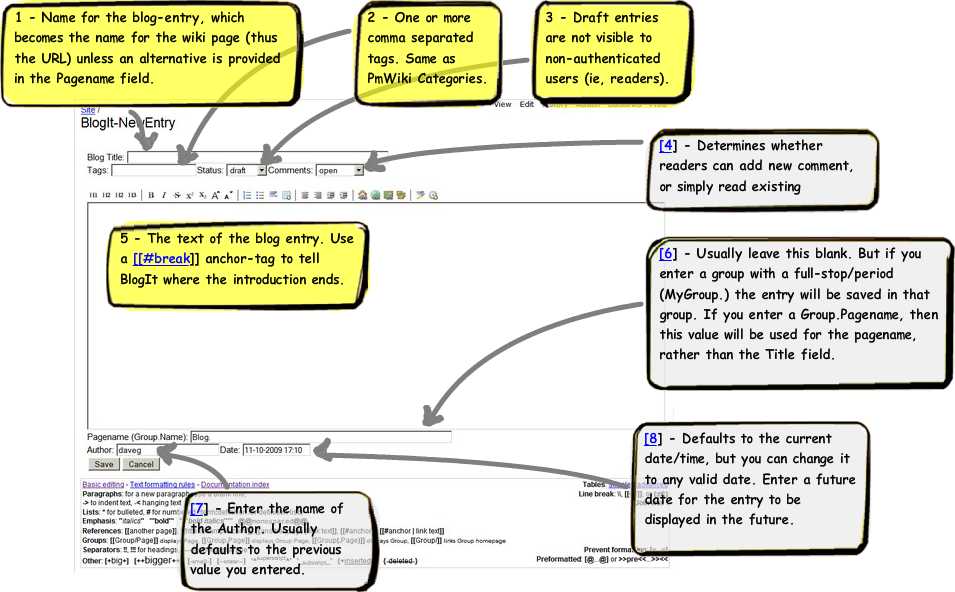

Click to Enlarge
- Blog Title: The name of the blog entry. The name will hyphenated, and use to name the pmwiki page (refer to the Pagename field), and will thus become part of the url. Usually you want this to be as descriptive of the blog-entry as possible.
- Tags: One or more comma separated tags. These are the same as PmWiki Categories, and may be used to group entries by topics. The tags are shown to readers as links which when clicked list other similarly tagged blog entries. The tags are also shown in the sidebar tag list.
- Status: Blog entries can be either Draft, Publish, or Sticky (additional statuses can be added if required). Statuses are usually used within pagelists to differentiate between groups of blog entries. Sticky entries are usually displayed on the front-page, before the Published entries. Draft entries are the only status where unique processing takes place. Draft entries will not appear in the sidebar Recent Entries list, and will not appear in tag lists. They will also not be accessible to non-authenticated users.
- Comments: Defines whether readers can leave comments for this blog entry. The value selected here applies only to this entry, and can be over-ridden site wide with the
$bi_CommentsEnabledsetting. Comments can be automatically set to read-only after a defined period of posting$bi_CommentsAutoClose.- Open: Allows readers to leave comments.
- Read Only: Readers cannot leave new comments, but can read comments that have already been made.
- None: Readers cannot leave new comments, and existing comments are not displayed. Note that existing comments still exist, and are not deleted, they just are not shown.
- Blog Entry: This is the large unlabelled textarea. Use any PmWiki markups and text formatting.
The
[[#break]]anchor can be used to break longer blog entries into an introduction, and a 'body'. When the blog-summary pagelist is used (usually on the main page), blog-entries will be displayed up to the[[#break]]tag, where a "Read more..." link will be displayed. Readers can click the link to read the rest of the entry. You can change the tag used to break entries, or change the text displayed to readers when the break tag is used. - Pagename (Group.Name): Usually you'll leave this field as it is -- just don't enter a value here. This field is pre-populated with the default blog group. If you leave this field with only the blog group, the blog entry will be saved in a PmWiki page named by hyphenating the title field. If you want the page to be saved in a different PmWiki group, or you want the page to have a different name to the value in the Title field, then enter a value. Make sure the name you provide here is a valid PmWiki pagename (ie, no spaces), and doesn't already exist. BlogIt will return an error if you specify an invalid pagename.
- Author: Defaults to the value you previosuly entered. You can enter any name you like here, no validation is performed.
- Date: This field will be pre-populated with the current date and time. You can change this to any valid date/time combination. The default format for entering a date (which can be changed) is
15-03-2009 23:34. If you set a date/time which is in the future, the entry will not appear in pagelists until that date/time arrives. More information on this behavior is in the FAQ.
Comment Administration
Whenever you see a comment, and if you are logged in with the appropriate privileges, you will see a set of admin links, allowing you to either Approve/Unapprove, Delete, Edit, and Block a comment. Some actions require appropriate privileges. On the blog single-entry administrators can click on any number of comments, and use the menu on the 'Comment' heading to perform bulk actions.
- Comment Approval: By default, if you have Captcha enabled, reader comments do not need to be reviewed and approved before being publicly visible. You can change this behavior, and manually approve comments before making them visible. If you are logged in with comment-approve or blogit-admin privileges, then your comments will automatically be approved.
If you are manually approving comments, use the "Unapproved comments" link in the sidebar -- this link will also show a count of how many unapproved comments there are. (If you don't use the BlogIt sidebar, then add this to your blog url
?n=Site.BlogIt-Admin?action=blogitadmin&s=unapproved-comments&blogid=blog1.) The "Unapproved comments" page will show a list of all comments awaiting approval, for each blog-entries. Simply click the Approve, or Unapprove. As you approve comments they will be automatically removed from the list. Needs 'comment-approve' privilege. - Deleting Comments: When you click the Delete link on a comment you will be asked to confirm the delete. BlogIt uses PmWiki's delete mechanism, so if you do delete a comment in error, the deleted page still exists on the server (with a timestamp) and can be restored to the former page by the wiki administrator. Needs 'comment-edit' privilege.
- Editing Comments: Comment editing allows you to use a form to edit any element of the comment, or manually change the comment status. Needs 'comment-edit' privilege.
- Blocking Comments: You can view the commenters IP address, and then choose to add that IP address to the standard PmWiki blocklist page, usually
SiteAdmin.Blocklist. When clicking the Block link, you will be presented with the IP address of the comenter. Either accept this, or change it, perhaps to include a '*' wildcard. Needs 'comment-approve' privilege. Note: You need to enable Blocklist with$EnableBlocklist=1;and theSiteAdmin.Blocklistneeds to exist, otherwise BlogIt will be unable to write to the page.
By default comments will automatically be approved if you have captcha enabled. You can change this behavior by setting $bi_DefaultCommentStatus.
Security
Most blogs are not public, so at the very least you probably want to lock things down, by adding edit and admin passwords to config.php:
$DefaultPasswords['admin'] = crypt('secret');
$DefaultPasswords['edit'] = crypt('secret');
BlogIt Roles and Actions
By default BlogIt defines a single 'role' with all 'actions' assigned to the role. Currently valid actions are:
- 'comment-edit': Ability to edit all user comments, and to view Unapproved Comments.
- 'comment-approve': Ability to approve comments, and view Unapproved Comments.
- 'blog-new': Allows the user to create new blog-entries.
- 'blog-edit': Permit editing of existing blog-entries, including changing the blog-status from Draft to Published.
- 'sidebar': View the BlogIt sidebar, which provides quick access to Draft, Published, Sticky, Statistics, etc.
- 'blogit-admin': Access to the blogit-admin page which displays drafts/published, etc.
Using Standard PmWiki Security (not using AuthUser)
By default anyone with Edit permissions is able to perform all actions. You can change this behavior by over-riding $bi_Auth. The array takes this format:
- a single string with the name of the role. If you're not using AuthUser role names should be "edit" or "admin". If you are using AuthUser role names can be anything you like.
- an array of actions.
By default the array is:
$bi_Auth = array(
   'edit'=>array('comment-edit', 'comment-approve', 'blog-edit', 'blog-new', 'sidebar', 'blogit-admin')
);
You might want to change that so only Admins can edit and approve comments:
$bi_Auth = array(
   'edit'=>array('blog-edit', 'blog-new', 'sidebar', 'blogit-admin'),
   'admin'=>array('comment-edit', 'comment-approve')
);
- If you are not using AuthUser, then roles are heirarchical. So 'admin' will inherit 'edit' actions.
- By default BlogIt requires edit permissions to be set on a page defined in
$bi_AuthPage, initially to$bi_DefaultGroup.$DefaultName(usuallyBlog.Main). You can change this page to any page whith edit permissions set -- BlogIt simply uses this to determine that the user has Edit permissions, and does not change this page.
Using AuthUser
You can use AuthUser to provide fine grained access to the blog and its features.
Here's an example where we use two BlogIt roles, one for blogs and one for comments. We then setup two users, 'step' who can create/edit blog-entries, and 'daveg' who can approve comments.
# [1] Define BlogIt roles, and associated actions
# Actions: 'comment-edit', 'comment-approve', 'blog-edit', 'blog-new', 'sidebar', 'blogit-admin'
$bi_Auth = array(
	'blogs'=>array('comment-edit','blog-edit', 'blog-new', 'sidebar','blogit-admin'),
	'comments'=>array('comment-approve', 'sidebar','blogit-admin')
);

# [2] Define users passwords
$AuthUser['daveg'] = crypt('daveg');  #set daveg password
$AuthUser['step'] = crypt('step');  #set daveg password

# [3] Add users to the roles
$AuthUser['@blogs'] = array('step');
$AuthUser['@comments'] = array('daveg');

# [4] Assign roles to security groups
$DefaultPasswords['blogs'] = array('@blogs');
$DefaultPasswords['comments'] = array('@comments');

# [5] Assign roles to pmwiki actions
$DefaultPasswords['edit'] = array('@blogs', '@comments');

include_once("$FarmD/scripts/authuser.php");
Alternately you can simply store passwords [2] and users/role assignments [3] in Site.AuthUser or SiteAdmin.AuthUser, in the normal way. In this case simply assign some users to a group (for example @blogs):
@blogs: user1, user2
Then in config.php:
# [1] Define BlogIt roles, and associated actions
# Actions: 'comment-edit', 'comment-approve', 'blog-edit', 'blog-new', 'sidebar', 'blogit-admin'
$bi_Auth['blogs'] = array('comment-edit', 'comment-approve', 'blog-edit', 'blog-new', 'sidebar', 'blogit-admin');

# [5] Assign roles to pmwiki actions
$DefaultPasswords['blogs'] = array('@blogs');
Internationalization
If you create a new translation, please post it for others to use!
Language Translations
BlogIt utilizes PmWikis built in internationalization mechanism. All text strings are stored in Site.XLPage-BlogIt.
- Either create a new language translation page, or use an existing one. To create a new page, copy the content of
Site.XLPage-BlogItto a new page, ie,Site.XLPage-BlogIt-LANGUAGE, and enter the translations within the empty quotes. For example, replace the empty quotes below:'more' => ''
With the language translation:'more' => 'plus'
- Load the page in
config.php:XLPage('ABBR','Site.XLPage-BlogIt-LANGUAGE');
You can also use this method to rename any of the labels that BlogIt uses. So if you prefer to have the "more" link in the sidebar read "archive" just create a new XLPage and load it in config.php, using the preferred term rather than a 'true' translation. For example:
English XLPage:           'more' => 'archive'
Other Language XLPage:    'more' => 'more-translated'
Changing Date Display and Entry Formats
These date formats are defined by BlogIt. Note that a skin may define additional formats, so check in Site.XLPage-skinname.
- long date:
%B %d, %Y, at %I:%M %p - short date:
%B %d, %Y - date entry:
%d-%m-%Y %H:%M
You typically want to change date formats when you use PmWiki in a non-English language. BlogIt date formats are stored in Site.XLPage-BlogIt -- so simply make a copy of that page, and load it as you would when adding internationalization support.
Alternately, if you want to change the date formats and not make any other language alterations, add this to config.php, using the original format in the list above as the string used in the array. In this case the 'long-date' is being redefined to %d %B, %y, at or around %H:%M:
$XLLangs[]='blogit';
$XL['blogit']['%B %d, %Y, at %I:%M %p'] = '%d %B, %y, at or around %H:%M';
If you want to use European date entry formats like 'dd/mm/yyyy' which might be confussed with 'mm/dd/yyyy' set $bi_DateStyle.
Changing the Character Set
BlogIt automatically uses UTF-8 character set for page names. You can change this behavior in the using the basic PmWiki configuration, by changing $MakePageNamePatterns, for example Cookbook.ISO8859PageNameConversionPatterns. For example to use ISO-8859:
$Charset='ISO-8859-1';
# additonal character conversion patterns for ISO 8859-1 character set
SDV($PageNameChars, '-[:alnum:]');
SDV($MakePageNamePatterns, array(
    "/'/" => '',
    "/[^$PageNameChars]+/" => ' ',
    '/((^|[^-\\w])\\w)/e' => "strtoupper('$1')",
    '/ /' => ''
));
# additonal character conversion patterns for ISO 8859-1 character set
SDV($ISO88591MakePageNamePatterns, array(
	'/Á/' => 'A',	'/Â/' => 'A',	'/Ă/' => 'A',	'/Ä/' => 'Ae',	'/Ĺ/' => 'Ao',	'/Ć/' => 'Ae',	'/Ç/' => 'C',
	'/Č/' => 'E',	'/É/' => 'E',	'/Ę/' => 'E',	'/Ë/' => 'E',	'/Ě/' => 'I',	'/Í/' => 'I',	'/Î/' => 'I',
	'/Ď/' => 'I',	'/Đ/' => 'D',	'/Ń/' => 'N',	'/Ú/' => 'U',	'/Ó/' => 'O',	'/Ô/' => 'O',	'/Ő/' => 'O',
	'/Ö/' => 'Oe',	'/Ř/' => 'Oe',	'/Ů/' => 'U',	'/Ú/' => 'U',	'/Ű/' => 'U',	'/Ü/' => 'Ue',	'/Ý/' => 'Y',
	'/Ţ/' => 'Th',	'/ß/' => 'ss',	'/ŕ/' => 'a',	'/á/' => 'a',	'/â/' => 'a',	'/ă/' => 'a',	'/ä/' => 'ae',
	'/ĺ/' => 'ao',	'/ć/' => 'ae',	'/ç/' => 'c',	'/č/' => 'e',	'/é/' => 'e',	'/ę/' => 'e',	'/ë/' => 'e',
	'/ě/' => 'i',	'/í/' => 'i',	'/î/' => 'i',	'/ď/' => 'i',	'/đ/' => 'd',	'/ń/' => 'n',	'/ň/' => 'o',
	'/ó/' => 'o',	'/ô/' => 'o',	'/ő/' => 'o',	'/ö/' => 'oe',	'/ř/' => 'oe',	'/ů/' => 'u',	'/ú/' => 'u',
	'/ű/' => 'u',	'/ü/' => 'ue',	'/ý/' => 'y',	'/ţ/' => 'th',	'/˙/' => 'y'
));
# join to standard patterns
$MakePageNamePatterns = array_merge($ISO88591MakePageNamePatterns, $MakePageNamePatterns);
Charset Conversion Routines
BlogIt will use which ever Charset you defined within PmWiki, except when using Ajax functionality, which must use UTF8. By default BlogIt will transparently convert from UTF8, back into the Charset you have specified in $Charset, using a PHP routine 'iconv'. In some cases, web-hosts do not provide access to this routine. In these cases you can override the routing BlogIt uses by setting $bi_CharsetFn to the name of a function that converts from UTF8 to a specified charset. The function must take the form ($val, $src='', $tgt='UTF-8') where:
- $val: String value to be converted
- $src: Source charset, which by default will be $Charset
- $tgt: The target charset, which for BlogIt use only need to support UTF8, which is the default.
Skin Support
Some skins provide additional support for BlogIt, allowing page elements to be repositioned and syled specifically for that skin. In cases where the skin does not provide this built-in support you have a few options for improving the standard appearance. The standard PmWiki skin is an example of a skin that will work with BlogIt, but whose appearance can be improved by using an additional stylesheet.
Skin Settings
- $bi_AjaxMsgTimer (integer): The amount of time that the ajax confirmation message stays on the screen, in milli-seconds. Default is 3000 (3 seconds).
- $bi_SkinSettings (array): Allows control over skin level elements.
- ajax_textarea_rows: Defines the number of rows to be displayed in the main textarea on ajax edit. Typically there is less space for ajax editing than there is for 'normal' editing.
- $bi_SkinClasses (array): Defines the names of CSS container classes for blogit DOM objects. Ajax operations will work even without these classes, but you may not see the result of the action updated on the page until you manually reload the page. The classes are used to determine where to load or remove content without having to reload the entire page. The classes can generally be applied to any kind of DOM object (tables, rows, divs, ul, ol, etc.).
- 'blog-entry' => '.blogit-post', #container for entry in single-entry view, which should include the ajax edit-link.
- 'blog-entry-summary' => '.blogit-post-summary', #surrounds a blog entry in multi-entry view (in #multi-entry-view); cannot be the same CSS path used for blog-entry
- 'blog-list-row' => '.blogit-blog-list-row', #used in the grid displaying draft/approved blog entries. Usually applied to the row for each entry (in #blog-list-view)
- 'approved-comment-count' => '.blogit-comment-count a', #count of comments for an entry
- 'unapproved-comment-count' => '.blogit-unapproved-comment-count a', #count of unapproved comments for an entry
- 'comment' => '.comment', #MUST be a single css class NOT a css-path. applied to each block containing a single comment, usually LI elements (in #comment-view-all and #comment-view-admin)
- 'comment-admin-list' => '.blogit-comment-admin-list', #surrounds the unapproved-comment list section (in #comment-view-admin)
- 'comment-list' => '.blogit-comment-list', #pointer to the entire comment list, excluding headers, and comment form. Contained in #comments-pagelist, usually not changed.
- 'comment-list-wrapper' => '#blogit-comment-list', #pointer to a wrapper around the comment-list; used for the first comment, where 'comment-list' may not exist. Should not include headers or form.
- 'blog-form' => '#wikiedit.blogit-blog-form', #pointer to the wrapper containing the blog-entry FORM object
- 'comment-form' => '#wikitext .blogit-comment-form', #pointer to the wrapper containing the comment-entry FORM object (both ajax and normal entry)
- 'comment-list-block' => '#wikitext ol.blogit-comment-list', //pointer to direct wrapper containing all comments
- 'comment-submit' => '#wikitext .blogit-submit-row', #pointer to the wrapper containing the captcha and comment Submit
- 'comment-summary-title' => '#wikitext .blogit-comment-summary h3', #pointer to each page title on the unapproved comment admin page
- 'comment-block-title' => '.blogit-commentblock h2', #pointer to each page title on the unapproved comment admin page
- 'comment-tag' => 'li' #tag used for each comment in single view mode
Skin Stylesheets
Listed below are some CSS stylesheets for skins that don't natively support BlogIt. These skins can still be used with BlogIt, with or without the stylesheets -- the stylesheets simply improve the styling for the page elements that BlogIt adds.
If the skin you use is not listed below, try using the PmWiki stylesheet -- it provides some basic styling to BlogIt elements that should work on most skins.
Feel free to add your own stylesheets for your favorite skins.
- PmWikiΔ: Ships with BlogIt, and is automatically applied when PmWiki skin is active.
- TriadΔ: Provides basic styling for the popular Triad skin. Also load the PmWiki stylesheet for more complete styling. Note that this stylesheet is setup for Triad using the 'choc' color theme. If you use another color theme, then update the two colors for the classes 'h2 a' and '.blogit-meta-data-footer'.
- Save the stylesheet in a publicly accessible directory, usually
pmwiki/pub/css/. - Add this to
config.php, replacing 'blogit-SKINNAME.css' with the name of the skin file you saved.
$PageCSSListFmt['pub/css/blogit-pmwiki.css'] = '$PubDirUrl/css/blogit-SKINNAME.css'; #Replace SKINNAME with the name of the skin
You can use the blogit-pmwiki.css file as a starting point for providing BlogIt support to other skins.
Validate XHTML Strict
In order to ensure strict XHTML validation with skins which are written to that specification add this to config.php:
## For strict validation
SDV($InputTags['end'][':html'], '</fieldset></form>');
SDVA($InputTags['pmform'][':html'], "<form action='{\$PageUrl}' \$InputFormArgs><fieldset><input type='hidden' name='n' value='{\$FullName}' /><input type='hidden' name='action' value='pmform' />");
Adding More Features to your Blog
BlogIt provides basic blog support, but relies on other cookbooks to add functionality. Below are some cookbooks that work well with BlogIt, and some suggested settings. Of course, there are always options -- you don't have to use these cookbooks, others will likely work with no issues.
Stop Comment Spam
Comment captcha will only work if you assign Edit and Admin passwords.
Three days after I posted the link to the demo site on the PmWiki mailing list I was getting comment spam. Stop it dead, with some form of captcha cookbook:
- ReCaptcha: Nothing specific for BlogIt, just follow directions on ReCaptcha page.
- Captcha: Download captcha.phpΔ (from Captcha), put it in your cookbook directory, and add this line to config.php before including blogit.php.
$EnableCaptchaImage=1;
if (!CondAuth($pagename,'edit')) $EnablePostCaptchaRequired = 1;
include_once("$FarmD/cookbook/captcha.php");
Captcha will now be active for comments. Captcha is automatically deactivated when creating or editing blog entries, since you need to be logged in under the Edit or Admin password in order to edit.
If you don't see the captcha enabled for comments, make sure you have assigned edit and admin passwords on your wiki. If you don't assign passwords, then everyone has Edit and Admin access, which causes BlogIt to disable the captcha. The implication of this is that you can't currently use BlogIt in a completely open wiki (no edit or admin passwords), and also enable Captcha -- if there is strong demand for this type of blog then let me know.
Improved Edit Toolbar Icons
Use EditToolbar for an improved toolbar while you edit. You need to enable buttons BEFORE you include blogit.php, otherwise the buttons will not be displayed correctly.
$EnableGUIButtons = 1;
include_once("$FarmD/cookbook/edittoolbar.php");
Page Counters
Note: Full integration with TotalCounter is not currently implemented, as TotalCounter does not display page counts correctly within pagelists.
BlogIt will display page counts set by cookbooks using the {$PageCount} variable, like TotalCounter.
include_once("$FarmD/cookbook/totalcounter.php");
Show YouTube and other videos
Use Ape. Easy, lightweight and unobtrusive embedding of maps, videos and more in wiki pages.
Google Sitemaps
One way to make sure your site is found by search engines is to submit a sitemap to the search engine. Use Google Sitemaps. In order to prevent search engines seeing pages they don't have access to, include some additional search patterns to exclude SiteAdmin, and the comment group.
if ($action=='sitemap'){
   $EnablePageListProtect = 1;
   $SitemapSearchPatterns[] = '!^SiteAdmin\.!';
   $SitemapSearchPatterns[] = '!^Comments\.!';
   include_once("$FarmD/cookbook/sitemap.php");
}
Page Conversion (to BlogIt, and away from BlogIt)
BlogIt uses Page Text Variables to store blog entry attributes. BlogIt pages look like regular PmWiki pages when viewed with BlogIt disabled -- because they are regular PmWiki pages. If you do a 'normal' PmWiki edit on a blog entry you'll see the variables BlogIt uses.
In order to either add or remove the attributes, simply use the converter utility. The utility can only be run by an Admin. All actions are controlled using URL parameters. Available parameters are:
- action: blogitupgrade -- initiates the upgrade/conversion utility.
- pattern: If this is not specified, then the upgrade will operate on the current page only. Multiple comma separated patterns can be provided. The pattern follows a regular expression format. By default the pattern is inclusive, and will match partial names, so 'Blog\.Page1' will also match 'Blog.Page12'; use a '$' at the end of each pattern to ensure a direct match 'Blog\.Page1$'. (Note: Even if you are using clean URLs, specify page names with a 'dot' separator.)
The pattern will automatically include/exclude patterns specified by
$SearchPatterns['default']. So if you want to exclude Site/PmWiki group pages, either setup your$SearchPatterns['default']or specify the exclusion in the pattern.- Group\.*
- Group\.Page
- writetofile (true|false): only writes to the PmWiki file if this is "true" -- otherwise outputs results to browser. So leave this parameter off and verify output in the browser, before updating your PmWiki files.
- mode (upgrade|convert|revert): If not specified, then BlogIt will attempt an upgrade. If you want to convert a vanilla PmWiki page into a BlogIt entry, then use the "convert". If you want to remove the PTV attributes from the page then use "revert".
- blogid: Defaults to "blog1". Only use this if you are running a mutliple blogs from within the same wiki.
Conversion Process
This process will add PTV values to the PmWiki page. When you run the utility leave out the writetofile parameter until you've checked the results in the browser.
- Make a backup of
wiki.d. This process has been rigorously tested -- but caution should prevail. - Append
?action=blogitupgrade&pattern=Blog\.to your URL (for instance the homepage). This step makes no changes -- it outputs all changes that will be made. The pattern 'Blog\.' will process all pages in the Blog group. If you have a huge number of pages (more than a few hundred for instance) you might want to use a different pattern. Verify that the correct pages are being converted, and that things look right. - Append
?action=blogitupgrade&mode=convert&pattern=Blog\.&writetofile=trueto your URL (for instance the homepage). This step will write the changes to all matched pages, updating to the new format.
When you run without the writetofile parameter you should see something like:
Main.Main
[[#blogit_pmmarkup]](:title 12341:)[[#blogit_pmmarkupend]]
(:blogid:blog1:)
(:entrytype:blog:)
(:entrydate:1239246060:)
(:entryauthor:DaveG:)
(:entrytitle:12341:)
(:entrystatus:draft:)
(:entrycomments:open:)
(:entrytags::)
[[#blogit_entrybody]]2131[[#blogit_entrybodyend]]
Pattern Samples
Converting a Single Page
Convert the page "Blog.Main":
?action=blogitupgrade&mode=convert&pattern=Blog\.Main$
Converting All Pages in a Group
Convert all blog entries in the "Blog" group:
?action=blogitupgrade&mode=convert&pattern=Blog\.
Converting a number of pages
In this case we match all entries in groups Blog, and Main, the page MyGroup.MyPage, and all pages in the group MyGroup starting with 'A'. Patterns are inclusive by default, which is why the final pattern matches all pages starting with 'A'. Also note that the dot delimiter is prefixed with a '\' -- otherwise it means 'any character'.
?action=blogitupgrade&mode=convert&pattern=Blog\.,Main\.,MyGroup\.MyPage,MyGroup\.A
Use a '$' at the end of each pattern to ensure a direct match.
?action=blogitupgrade&mode=convert&pattern=Blog\.,Main\.,MyGroup\.MyPage$,MyGroup\.A$
Converting all pages
You can convert all pages at once, using the '.' wildcard. Use this with extreme caution, as it will convert all PmWiki documentation pages, and possibly other system related pages:
?action=blogitupgrade&mode=convert&pattern=.
Converting from BlogIt format to normal PmWiki pages
This function removes the PTV fields added by BlogIt, leaving basic PmWiki pages. You can do the same thing manually, by using the normal PmWiki 'edit' function, and removing the PTV fields.
?action=blogitupgrade&mode=revert
If everything looks okay, then commit the changes:
?action=blogitupgrade&mode=revert&writetopage=true
Advanced Changes to BlogIt
The following setting are also available, and can be made in a config.php file:
- $bi_Ajax (array): Defines which actions are Ajax oriented, and which should be handled in the normal page-reload way. Specify the action as the key, and either 'ajax', 'normal', 'normal-ajax', 'ajax-normal'. The last two options allow the user to select ajax/normal actions by showing a normal link, and a small icon link for the alternate action.
SDVA($bi_Ajax, array('bi_ce'=>'ajax', 'bi_ca'=>'ajax', 'bi_cua'=>'ajax', 'bi_be'=>'normal-ajax', 'bi_ne'=>'normal-ajax', 'bi_del'=>'ajax')); #key: action; value: ajax style
- $bi_DateStyle (default 'dmy'): Set to indcate the sequence of date components, day, month, and year. Valid styles are 'dmy', 'mdy', and 'ymd'.
- $bi_DefaultGroup (default 'Blog'): Pre-populates the Pagename field; blogs can exist in *any* group, not simply the default defined here.
- $bi_CommentGroup (default 'Comments'): Default group where comments are stored.
- $bi_DefaultCommentStatus (default 'true' if captcha enabled): Sets the default approved status for comments. Determines whether an admin need to approve each comment before it is displayed.
- $bi_CommentsEnabled (default 'open'): Global setting to enable or disable comments. If comments are disabled, no new comments can be entered. Can be 'open', 'readonly', 'none'.
- $bi_CommentsAutoClose (default ''): Disable comments after a period of time, to reduce spam (overrides $bi_CommentsEnabled. '1 month ago', '-1 week', etc.
- $bi_BlogGroups (default $bi_DefaultGroup): Pipe separated list of Blog groups. This is purely to speed up pagelists. Defining this list does not mean all pages in the group are 'blog-pages', but it does mean that blog pages will only be searched for in this group. Define as an empty string to search all groups for blog-entries.
$CategoryGroup(default 'Tags'): Group to be used for blog tags. Tag pages are automatically created in this group as tags are used within blogs.- $bi_AuthorGroup (default 'Profiles'): The group to be used for blog and comment author profiles, if used.
- $bi_EntriesPerPage (default 10): Restrict the number of entries per page. You can also set this within the pagelist itself if you want to over-ride the global setting -- use the
count=parameter. - $bi_LinkToCommentSite ('true'): Users may enter a "Website" when leaving a comment. This setting determine whether or not to display the "Website" as a link. Even when displayed as a link it will have the "nofollow" attribute.
- $bi_BlogList (default array('blog1')): Used if you want to manage more than one blog on a single PmWiki installation. Adding additional blogs will automatically create a select list on the blog entry form so you can choose which blog the post belongs to. Ensure 'blog1' key remains.
$bi_BlogList = array('blog1','blog2','blog3');
- bi_Paths: BlogIt automatically loads three cookbooks as needed. This array defines the paths to those cookbooks. Default:
array('pmform'=>"$FarmD/cookbook/pmform.php", 'guiedit'=>"$FarmD/scripts/guiedit.php", 'convert'=>"$FarmD/cookbook/blogit/blogit_upgrade.php")
- $bi_UnstyleFn: Pointer to a function that strips PmWiki markup from user comments, to ensure comment display in sidebar does not become 'infested' with user styling.
- $bi_CharsetFn: Pointer to a function that converts from the PmWiki $Charset to UTF-8, which is required for Ajax handling. By default BlogIt uses iconv for this conversion, but some web hosts do not provide this function.
Changing Blog Status Values
You can add new status values to the pull-down list available on the new entry form. You might do this if you want additional groups of blog-entries.
$bi_StatusType['new status']='new status';
Custom Page Titles, and Changing Default Processing
The variable $bi_Hooks allows administrators to specify functions for each page-type, either blog or comment, that will be executed at a specific processing stage either pre-entry, pre-save, or post-save. This allows administrators to change the default behavior of BlogIt, for instance, by specify different default values for fields, or altering the format of page names.
- pre-entry: Runs before the edit form is created. Use
$actionto determine what is being processed (ie, new entries, is 'bi_ne'). - pre-save: Runs before BlogIt pmform processing.
- post-save: Runs after BlogIt pmform processing.
$bi_Hooks is an array of page-types, containing an array of processing stages, itself containing an array of functions to be called. Set values for $bi_Hooks before BlogIt is included.
$bi_Hooks['blog']['pre-entry']='processBlogsPreEntry';
$bi_Hooks['comment']['post-save']='processCommentsPostSave';
More than one function can be specified for each page-type/stage combination, using an array. In the example below two functions will get called pre-entry for blogs.
$bi_Hooks['blog']['pre-entry'][]='processBlogsPreEntry1';
$bi_Hooks['blog']['pre-entry'][]='processBlogsPreEntry2';
$bi_Hooks['comment']['post-save']='processCommentsPostSave';
Changing the default status for new blog-entries
In this case specify a hook for blog page-types during pre-entry. Then check that the current action is for new blogs $action=='bi_ne', and set the entrystatus.
$bi_Hooks['blog']['pre-entry'][]='processBlogsPreEntry';
function processBlogsPreEntry($src, $auth){
global $_POST,$action;
	if ($action=='bi_ne')  $_POST['ptv_entrystatus']='sticky';
}
Changing the pagename format
To add the date to the name of the wiki page, hook into the blog post-save processing.
$bi_Hooks['blog']['post-save'][]='renameNewEntryUrl';
function renameNewEntryUrl($src, $auth) {
global $_POST;
	$_POST['ptv_entryurl'] = MakePageName($src, $_POST['ptv_entryurl'].'-'.strftime('%Y%m%d',$_POST['ptv_entrydate']));
}
Another example from Farvardin, "For my needs, I found that I wanted to create a default page name for my entries, based on today's date. Therefore I added this to my local/config.php:"
$bi_Hooks['blog']['pre-entry'][]='processBlogsPrePagename';
function processBlogsPrePagename($src, $auth){
   global $_POST,$action;
   $today = date("Y-m-d");
   if ($action=='bi_ne') $_POST['ptv_entryurl']='Blog.'.$today;
}
FAQ
Edit the BlogIt FAQ page to add or edit FAQs. Also refer to the Talk pages -- someone may have had a similar problem or question.
Blog entries are not shown
If you're readers (usually non-authenticated) cannot see the content of your blog entries, and only see the title, make sure you have set the status of the entry to something other than Draft. Draft entries are not shown unless you are logged in with Edit or Admin privs.
Changing Tag Used for Breaking Entry
You can change both the tag used to determine the end of the entry introduction (by default [[#break]], and also the text used to display the link to the full entry (by default Read more...). As with date formats you can either change the entries in the XLPage, or make a change in config.php:
$XLLangs[]='blogit';
$XL['blogit']['break']='split';
$XL['blogit']['Read more...']='Continue reading...';
Note: If you change the break tag, then entries using the old break tag will no longer break. You'll need to manually update entries which use the older break tag.
How to hide the standard Action menu
You can hide the action menu (containing View, Edit, History, Backlinks) on an individual page by adding this markup to the page:
(:noaction:)
Or for the whole wiki with:
SetTmplDisplay('PageActionFmt',0);
The notitle directive does not remove title from blog summary list
This is really down to how the summary list was designed to work -- without the title there would be no deliniation between blog entries. However, you can override this functionality by overriding the blog summary pagelist, or creating a new pagelist. To override the default pagelist, which is in Site.BlogIt-CoreTemplate:
- Create a PmWiki page called
Site.BlogIt-SkinTemplate-SKINNAME, or edit the page if it already exists -- replace the word SKINNAME with the name of the skin you are using. - The exact markup you see will depend on the skin you are using. Use this sample as a template for creating the list as you want to see it. For instance remove the heading line (2nd line) to remove the page title:
!!! #common-blog-head %h3%
Parameters: title, listformat (show header or not), entrydate, entrytags, fullname, entryauthor, showcount
[==[==]@
(:if false:)[[#common-blog-head]](:ifend:)
(:if equal "" "true":)!! [[ | ]](:ifend:)
(:div9999 class="blogit-meta-data-head":)
(:blogit-skin author pre_text='!!!!!$[By] ' post_text=', $[on] ':)(:blogit-skinend:)\
%blogit-date%(:blogit-skin date fmt='long':)(:blogit-skinend:)%%(:if:) \
(:blogit-skin edit pre_text='%blogit-edit-link%%item accesskey="$[ak_edit]"%' post_text='%%' page='':)$[edit](:blogit-skinend:)
(:div9999end:)
[[#common-blog-headend]]
@[==]==]
How can I create a list of only the last (newest) n entries?
Simply add count=n (replace the 'n' with a number) to the includesection statement or for a global setting set $bi_EntriesPerPage in config.php.
bi_EntriesPerPage = 15; #default is 10
How to Display Future Dated Entries?
BlogIt will not display entries which are dated beyond the current date. This way you can future date an entry, and it will automatically be displayed once that date is reached, if it is in "Publish" status.
If you want to always display future dated entries:
$bi_DisplayFuture = 'false';
Does BlogIt use cookies?
If you login as a user with BlogIt privs, BlogIt will use cookies to keep track of the page history trail (last two pages). It does this to make the Admin workflow smoother. So when you cancel a blog edit, or when you approve a comment, BlogIt will return to the page you were on previously. The cookie is only maintained for the current session, and is removed when you close the browser.
Cookies are not used for blog readers.
Admin is Redirected to Incorrect Page
If you are consistently being redirected to the same wrong page after performing an Admin function (comment edit, comment delete, comment approve, cancel from a blog edit, etc), and you were using BlogIt prior to version 1.2.0 delete all cookies associated with blogit:
- Site: Should be the domain name of your site.
- Cookie Name: blogit-back-1 and blogit-back-2
If you see multiple cookies with the same cookie name (blogit-back-1 and blogit-back-2), delete them all.
Change the default BlogIt styling
You can change the styling of BlogIt elements by using a stylesheet. Some skins come packaged with styling for BlogIt-specific elements. For skins that don't include specific styling for BlogIt you the PmWiki BlogIt stylesheet might work, or might be a good basis to create a new stylesheet for your skin.
Prevent Formatting in Comment when displayed in sidebar
BlogIt displays the first sentence (or until the first newline) of each comment in the Sidebar. Sometimes user use basic PmWiki formatting within comment, and this can adversely affect the look of the sidebar. For instance, if the comment text starts with %red% then the comment in the sidebar will be red. You have a couple of options in these cases:
- Edit comments either removing the offending formatting, or add a summary first sentence with no formatting.
- Use a recipe like MarkupToUnstyled to strip sidebar comments of formatting, and then tell BlogIt to use the function with
$bi_UnstyleFn:include_once("$FarmD/cookbook/markuptounstyled.php"); $bi_UnstyleFn = 'MarkupToUnstyled'; - Define a style to override the most common comment sidebar styling:
$HTMLStylesFmt['bi-pmwiki'] .= '.blogit-comment-summary-list li span {font-size: 100% !important;} '; - Define a style to override the most common comment sidebar styling, and then apply the style to the offending sentence in the comment, Thus, when the first line of a comment needs sanitizing, the reviewer can simply surround the offending sentence with the new class
%sidebaronly%sanitized title%%.$HTMLStylesFmt['bi-pmwiki'] .= '.sidebaronly { display:none; } #sidebar .sidebaronly { display:inline; }';
Problems with Passwords
BlogIt needs to be able to access text within pages -- that means it needs to be able to access pages. Thus BlogIt has to be included:
- AFTER passwords are defined in config.php
- AFTER the inclusion of the authuser script (if you're using it)
Automatically Approve all Comments
By default comments DO NOT need to be approved by an admin. If you have a captcha enabled, then that's usually enough to stop spam. However, if you need a level of admin approval set this in config.php:
$bi_DefaultCommentStatus = 'false';
Unapproved comments don't show in control panel
If you override $bi_DefaultCommentStatus make sure you provide a string value, not a 'boolean' value:
$bi_DefaultCommentStatus='false';
The browser title bar title shows the title from a blog-entry
You have manually included a (:title TBD:) markup in the body of one of your blog entries. Currently PmWiki gives precedence to titles that occur last in a page. Since the blog list page includes the first part of the blog entry, which includes the title markup, it overrides any prior title markups on the blog list page. You can work around this by setting a (:title TBD:) at the very bottom of the blog list page, after all the pagelists. Alternately refer to the one line fix on PITS 00779.
No entries listed in Recent Entries section
If you see no entries listed under the sidebar "Recent Entries" heading, and you do have entries that you would expect to see listed, ensure you have set the following in config.php. More info is on the Talk Page:
$EnableRelativePageVars = 1;
Cookbook Compatibility
Some extensions may adversly onteract with BlogIt settings, such as MultiLanguage. You have to edit multilanguage.php, and change the "$title" variable to something else.
Setting up an RSS feed
By default BlogIt will display an RSS feed icon in the browser bar. You can turn this feature off by:
$bi_RSSEnabled='false';
You can add an RSS link to a page with this markup:
[[{$SiteGroup}.BlogIt-Admin?action=rss | RSS Feed]]
You can change the page through which the RSS feed is accessed; the page does not need to exist. For example through the page Blog.RSS:
$bi_Pages['rss']='Blog.RSS';
BlogIt will display 10 entries on your RSS feed. Change this by setting:
$bi_RSSPerPage='15';
Using the Drafts Recipe and BlogIt
If you are logged in as an Edit user, and have enabled both the Drafts recipe and BlogIt, and try to perform an ?action=edit on a non-BlogIt page, then the Publish button will not be enabled. In this scenario you will need to ensure that you include the Drafts recipe from config.php, rather than relying on PmWiki to automatically include Drafts.
$EnableDrafts=1;
include_once("$FarmD/scripts/draft.php");
include_once("$FarmD/cookbook/blogit/blogit.php");
Some background: Drafts are enabled in PmWiki using $EnableDrafts=1, which provides a mechanism for saving pages a separate draft pages, with a "-Draft" suffix, and then later publishing the draft to the final page, basically changing the page name removing the "-Draft" suffix. This workflow doesn't really align with the way in which typical blogs operate, and so BlogIt implements it's own draft mechanism. In addition even if you were to enable Drafts, BlogIt doesn't use the normal PmWiki edit action, and so you would not see the Publish/Draft buttons.
How (:includesection ...:) works
Blog-it makes extensive use of pagelists and other markup, but this markup is rarely found in the source of the page you are viewing. Usually the markup is included ("brought into the page") via the (:includesection ...:) markup. Includesection simply goes to a defined set of pages and searches for the specified section -- the first section it finds (as named in the includesection markup) as it goes through the pages is then placed in the current page. The pages which are searched by default are these:
- Site.BlogIt-SkinTemplate-SKINNAME
- Site.BlogIt-CoreTemplate
This bit of code defines the precedence of the pages as blogit looks for the relevant section:
SDV($bi_TemplateList, (isset($bi_Skin)?$SiteGroup.'.BlogIt-SkinTemplate-'.$bi_Skin.' ' : '') .$SiteGroup .'.BlogIt-CoreTemplate');
The Power Behind the Code
BlogIt is brought to you with help from:
- jQuery 1.12.2: Javascript library, the base for the ajax functionality.
- jQuery Validation 1.15.0: Form validation, cheking dates, emails, and required fields.
- jBox 0.32: The slide down ajax message effect, admin menu, dialogs and prompts.
- Awesomplete 1.1.0: Tag auto-complete.
Known Issues
Edit the BlogIt Known Issues page to add or edit issues.
List is grouped by issue type, and within that group is in approximate level of urgency, so items near the top of each issue type are likely to get implemented first. Issues are formatted as described below:
- Will be worked on for the next release.
- Have been implemented, and are usually available in the development release, but not in the production release. If you want to see development features in action, they are usually in action on the demo site.
- Low priority, and are unlikely to be addressed.
The list serves as a roadmap and outlines the likely areas of focus for future releases of BlogIt, and provides guidance on how known issues will be addressed.
- Stability: Remove known bugs. Ensure coding approaches leverage the PmWiki framework appropriately. Security shake-down.
- Functionality Alignment: Verify co-existance with existing blog-related recipes. Bring the blog features up to par with traditional blogging platforms.
- User Interface: Create templates for existing skins, ajax ui, control panel.
- Scale Up: Ensure performance scales to blogs with thousands of pages, and comments.
- Importing: Provide a means of importing pages from existing systems (Blogger, WordPress, etc).
Bugs
- bug: Ignore double-click on dialog Submit. Currently causes Submit to be processed twice (at least two messages displayed).
- bug: BlogIt doesn't honor passwd* page attributes. Specifically, needs to support passwddelete and passwdedit. (Reported by SteP)
DaveG: ref http://www.pmwiki.org/pmwiki/uploads/Cookbook/deletepage.php - bug: Extraneous on #single-entry-view and #print-view after 1239246060(:blogit-skinend:). Unclear why, but it prevents (:div9999end:) being diaplayed on .blogit-meta-data-head.
- bug: Attachments use incorrect names. (Reported by circusmachina)
- bug: Cancel on
bi_becan send to another page (ref BlogIt-Talk#cencelissue, MichaelPaulukonis).
- bug: Passing count to the #blog-summary-pagelist template causes the same entries to be displayed when using prev/next links. (Reported by Marco)
- bug: [b-001] Sidebar tag/category list assumes all pages in
$CategoryGroupare tag pages. Also assumes that they are BlogIt tag pages (no differentiation is made between BlogIt tags and non-BlogIt tags).
DaveG: How to determine whether tag is a blogit tag, since tags are in referencing pages. - bug: Tag pages are created but do not contain referencing pages until the page containing a reference to the tag is re-edited and saved. In some case the Tag page is not created until subsequent editing of the referencing page. (Reported by Amos)
Note: Tag page only created for non-Draft entries. - bug: Tags containing accented characters are displayed as unencoded characters on viewing, but correctly in Ajax edit mode. Only affects Admin users.
- bug: RSS feeds do not work with pipe separated $bi_BlogGroups.
- bug: Conflict with SourceBlock (ref BlogIt-Talk#offbyn, MichaelPaulukonis).
- bug: Using Mini cookbook to display images and the downloadman for attached files, images disappear and the links are broken. (Reported by Blonder)
- bug: GUI Edit tool bar not displayed in Ajax dialog. (Due to execution of javascript embedded in json.)
- bug: After adding new tags to a blog entry via ajax, tag links (on viewing entry) are shown as links to ?action=edit, although tag page is created.
Problem exists because creating the tag page is slower than the Markup function. So the tag page gets created after the ajax call returns the new page content. - bug: Ajax message box is not displayed in IE6; screen jumps to bottom of dialog overlay. Workaround: Don't use Ajax modes with IE6.
- bug: Unsaved data warning is inconsistent across browsers: Opera and IE6 do not implement the event onbeforeunload; Chrome prompts even if Save button is pressed.
- bug: BlogIt is noot compatible with the cookbook Cookbook/MultiLanguage. For similar supported functionality use Cookbook/MultiLanguageViews.
New
- new: Option to allow comment-post to be ajax or normal. Normal is default.
- new: Move comment admin link into comment admin menu. Element id would need to be bi_ID<<commentid>>.<<basepage>> or store basepage as data element. Then move ID to class for [n-003].
DaveG: How to use menu in long lists of comments, when it's off screen? - new: Pass blogid on action=ne links, to allow config to default bi_DefaultGroup, and other settings based on blog. (Requested by BruceK)
- new: Add view all comments, group by blog entry.
- new: Create a pagelist which shows other pages with the same tags as current page, grouped=by tag. (ref http://www.linkwithin.com/learn?ref=widget)
- new: Save the entry, without leaving the edit form (quicksave) (Requested by Farvardin)
- new: When deleting comment/blog entry remove from sidebar. (Add class to links, using ID; create blogit-skin blog/comment to automate this. Create mechanism to allow multiple elements to be changed on ajax response.)
- new [n003]: Insert new non-draft entries into DOM. Possibly prepend to first 'blog-entry-summary'. (What to do when there are multiple blog lists on a page -- how to identify which one to insert into?)
- new: Combine javascript and css files to reduce server load. (Automate at deployment of master version.)
- new: Provide a mechanism to change the default value of entry fields (like Status). (Requested by rivaldo)
DaveG: Admin can make changes to #blog-post-control. Need to add 'required' classes to #blog-form-control for validate to auto-pickup. - new: Ability to post comments with no email/author/required fields. (Requested by David R)
DaveG: Admin can make changes to #comment-post-control. Need to add 'required' classes to #comment-form-control for validate to auto-pickup. - new: Control panel/dashboard for blog settings.
- new: Add rel='tag' to tag links (ref Cookbook/ListCategories). Applies to page body, not sidebar.
- new: links on blog pages to non-existent pages in default blogit-group open in blogit editor (or an easy way to add all blogit-entry boilerplate to a page. group.template, perhaps?)
- example: I'm editing
Blog.NewEntryand it contains a link toBlog.NonExistantPage. Instead of this link opening with the standard "page does note exist" message, it should open in the BlogIt entry editor. (Requested by MichaelPaulukonis, ref BlogIt-Talk)
- example: I'm editing
- new: * (optional?) ability to add (change) Summary change on blogit-edit; currently, all edit summaries are blank when viewing history
- perhaps most users won't do this; I'm using BlogIt as an "Engineer's Journal" so I'm revising the daily entries all day long.
- still, some users might? If not part of core BlogIt, how about as a plugin? (Requested by MichaelPaulukonis ref BlogIt-Talk)
- new Integrate Disqus for comments. No need to rewrite what's already there.
- new: Allow commenters to Subscribe to receive notification of new comments or changes to the entry. (Requested by Marcus)
Needs mechanism to subscribe to comment/entry updates; manage subscriptions; validate email address. - new: Provide support for displaying externally hosted gravatar based on name entered for comments. (Suggested by Luigi)
- new: Show 'preview' of comment before post. (Requested by Luigi)
Note: May not be possible, as PmForm seems to have no way to process but not save. - new: Admin by email for comment approve, delete, and block.
- new: Add mechanism for readers to 'flag' comments for admin review.
- new: Provide support for displaying twitter link based on name entered for comments. http://img.tweetimag.es/i/kirpi (Suggested by Luigi)
- new: Provide a means of approving comment url's when used with UrlApprovals (Ajaxify). (Requested by Step)
- new: Retain commenter name/website/email in cookie for auto-fill.
- new: List comments by person. (Provide a pagelist that can be manually included as part of Profile group-header.)
- new: Automatically break entry and insert Read More link introduction after n-lines. (Have global setting and per-page override?) (Requested by rivaldo, Blonder)
DaveG: Ref Cookbook/PagelistTemplateSamples fmt=#teasers - new: Add a confirmation dialog before deleting posts (using the non-ajax interface). (Requested by Farvardin)
- new: Allow listing of blog-entries by author. Add a pass-through parm author= to #blog-summary-pagelist in BlogIt-CoreTemplate. May need to be added to other pagelists. (Requested by SteP)
- new: Ability to add attachments when first creating page. (Requested by circusmachina)
- new: Ability to save drafts with invalid (or missing) dates. (Requested by OtherMichael)
- new [n002]: Add a mechanism to incorporate EditTemplates, to prepopulate the blog entry. (Requested by Luigi)
- new: Allow blog entry authors to edit their own posts, not posts by other authors. (Requested by Marcus)
- new: Provide an Ajax preview mechanism for blog entries. ($_REQUEST['preview'] = 1;)
Note: May not be possible, as PmForm seems to have no way to process but not save. - new: Post by email.
- new: Add user/skin-configurable ajax colors (un/approve comments; highlight section).
- new [n-001]: Add a mechanism to hide PmWiki edit link on blog entries (prevent confusion as to which edit link to use).
- new: Store intro-text (upto
[[#break]]tag, as(:Summary :...:). Might make processing faster? Will provide functionality if BlogIt is not being used. - new: Import from Google Blogger.
Changes
- CHG: PHP Deprecated (7.2):
- Function create_function() (line 929)
- Use of undefined constant bi_strtoupper_Wrapper - assumed 'bi_strtoupper_Wrapper' (line 156)
- Function create_function() is deprecated in /home/nepherim/apps/pmwiki/cookbook/blogit/blogit.php on line 929
- chg: Document Site.BlogList and ?blogid=
- chg: Ensure anything submitted as ajax is only accepted if $bi_Ajax action is defined as ajax. Prevent spoofing.
- chg: Reconcile and simplify skin-classes accessors.
- chg: Make blogit-skin markup parameters consistent (use page= for pagename, etc.)
- chg: Rename
Site.XLPage-BlogIttoSite.BlogIt-XLPagefor consitency with PmWiki XL. - chg: BlogIt-SideBar tags list should only show tags for a specific blog (not all blogs). (Need to add PTV to the auto-generated tag page, containing the blogid; this ptv can then be used on pagelists.)
DaveG: Ref tag bug [b-001].
- chg: CoreTemplate use null sequence for separating anchors on same line?
- chg: Define specific input form types. Refer to captcha.php (
$InputTags['captcha']). - chg: bi_IsDate should only checkdate for the format style passed in as $f.
- chg: Make bi_strtotime() more robust, actually parsing d/m/y, and re-ordering to a format that strtotime() can handle.
- chg: Make separator/pagenaming scheme used in pagename user-configurable. Groups with space are actually same as group name with hyphen, since space is auto translated to hyphen. (Reported by SteP)
- chg: Ensure RSS feed is specific to a blogid. (How to determine which blogid to use, for header-rss-tag?)
- CHG: Use Site.EditForm (
$PageEditForm), rather than CoreTemplates to store form layout; provides compatibility with other cookbooks (like Autosave). (ref [n002]) - chg: Use
$AuthUserFunctionsinstead of$AuthFunction? - chg: Is step 4 of security setup actually needed? ([4] Assign roles to security groups)
- chg: Simplify BlogIt security. There is not a clear deliniation between various actions. Basically there are too many actions. (ie, remove blogit-admin and sidebar and simply check for other actions; combine blog edit/new; combine comment-approve/edit.)
- CHG: Rename blog and comment fields, prefix with "blogit_" identifier, to prevent conflicts with other recipes (update bi_decodeUTF8() decode blogit vars only).
- chg: Ensure comment names are unique. (MakeSerialNumber(), uniqid())
- chg: Override normal edit link to point to BlogIt edit (
$HandleActions['edit'] = 'bi_HandleEdit';) (ref [n-001]). - chg: Investigate switch from jQueryUI/Validity (dialog (31k + 21k-css), and validation (14k)) to much smaller jQueryTools (16k, for Overlay, Date, and Validation), including client-side date selector. NB: Need replacement for animate colors in flash(); also for auto-complete.
Currently not worth doing. jQueryTools doesn't have 'suggest' code, so switching would save ~30k, excluding css.
Documentation
- doc: Update developer documentation. (Requested by Peter Bowers)
- doc: Add advanced skinning documentation, including templates and template ordering. and a list of vanilla stylesheet with all classes and ids that BlogIt-CoreTemplate uses. (Requested by SteP)
- doc: Comment page naming scheme.
Development Release
These issues are only found in the current development release.
Issues that need additional verification
If you are able to repeat any of these issues, please let me know how you did it!
- new: Verify support with Cookbook/ListCategories (may work -- not yet tested).
- new: Verify support with Cookbook/AutoSave (may work -- not yet tested).
- new: Verify support with Cookbook/XMLRPC (may work -- not yet tested).
Change Log
The most recent changes are listed below. A full archive can be found in the BlogIt release history.
1.9.6 (2024-09-14)
Contributors: Petko. Requested and tested by Fabien Vignes-Tourneret.
Release Summary
Many updates for PHP 8.2, diffs and downloads merged with origin, released as 1.9.6. (also available at https://github.com/5ko/BlogIt). Requires PmWiki 2.3.36 or more recent.
I do not use this recipe, if you uncover any problems I haven't noticed, please post on the BlogIt-Talk page or via email. Someone who regularly uses the recipe will be most welcome to take over the maintenance. --Petko
1.9.5 (1-Apr-2016)
Contributors: DaveG
Release Summary
Ensure tags are spaced correctly on single-entry -- ensure you update to the latest version of your skin. Some changes to internationalization. Locks down diff and source by default. Minor fixes and clean up.
Release Details
- bug: Spaced tags contain visible hyphen on single-entry. Compare to correctly spaced on sidebar. Purely visual, link functions.
- bug: Entering an invalid date causes "Warning: No message defined for ptv_entrydate".
- chg: #single-entry-view, #print-view, #blog-list-view, to pass in tag $page parameter.
- chg: Updated XL:
- Replaced 'Must be a datetime.' with 'Must be a datetime (dd-mm-yyyy hh:mm).'
- Added 'Please enter a valid email address.', 'Please enter a valid URL.'
- chg: Disable action=source, and diff.
- chg: Ensure admin can edit page with captcha and dev_mode.
- chg: Restrict reads through RetrieveCurrentPage to omit history.
1.9.4 (28-Mar-2016)
Contributors: DaveG
Release Summary
Fixed problem saving ajax mode.
Release Details
- chg: Move dev settings into $bi_Internal. Includes $blogit['debug'] and $bi_Dev.
- bug: Don't show captcha for auth users when ajax edit.
- chg: Move adding of bi_mode='ajax' back into ajaxSubmit from validate. Saves duplication across blog and comment.
1.9.3 (28-Mar-2016)
Contributors: DaveG
Release Summary
Fixed a bug when using $bi_CommentsAutoClose. Works with ReCaptcha.
Release Details
- new: Shows widget if ReCaptcha is enabled.
- new: Ensure comment post is non-ajax -- might slow down spammers.
- new: Added $bi_Dev, provides a way to use non-minified js, and show captcha.
- BUG: entrytype to be set to null when $bi_CommentsAutoClose; ajax returns 'captcha input'.
- bug: When captcha fails page is not reloaded. Title, with no body.
- bug: bi_frm_action is set to bi_ca for comment post.
- bug: Nexted conditionals in markup need to use () not [] in #comment-view-all, #comments-pagelist.
- chg: Added bi action bi_cp for comment post.
- chg: Scroll page to wikimessage.
1.9.2 (26-Mar-2016)
- bug: $bi_CommentsAutoClose did not work. Used PageTextVar not PageVar.
1.9.1 (26-Mar-2016)
Cleaned up code using pretty print. No other changes. (http://jsbeautifier.org/, http://beta.phpformatter.com/)
1.9.0 (26-Mar-2016)
Contributors: DaveG, SteP, circusmachina
Issue Reports: SteP, Blonder, circusmachina, Farvardin, John Rankin, Peter Bowers
Release Summary
Big bug fix release, and a few new features for bulk administration of comments.
- Add mechanism to bulk administer comments (delete, block, un/approve).
- Turn off comments after defined period from initial post (ie, '2 weeks ago', '-1 months'). Ref $bi_CommentsAutoClose.
- Using print link now works.
- Groups can now contain spaces/hyphens.
- Updated all dependent libraries.
- Use
$FarmPubDirUrlinstead of$PubDirUrl. - Updated all XL.
- Added ' row?', ' rows?', 'Cannot edit ', 'All', 'None', 'Approve', 'Unapprove', 'Block', 'Delete', 'Error on edit return.'
- Changed: 'Are you sure you want to delete?' to 'Are you sure you want to delete '
- Removed: 'Commenter IP: '
- Skin-Classes: Added 'comment-list-block', 'comment-submit', 'comment-summary-title', 'comment-block-title', 'comment-tag'
- BlogIt-CoreTemplate changes:
- #single-entry-view, #multi-entry-view, #admin-links: Removed .blogit-edit-link on edit link (post-1.7.0)
- #print-view: added
- #blog-list-view: Split admin links to bullet list, and applied class .blogit-admin-links to list
- #comment-view-all, #comment-view-admin: added .blogit-admin to header and LI element; pass base parameter to #admin-links
- #admin-links: Only show menu if auth; nsure lines don't split; added class .blogit-admin-links to LI element; pass base='' for comment edit/reply
- #comments-pagelist: Added parameter (bi_param base )
- #unapproved-comments: Added div.blogit-comment-summary; added parameter (bi_param base )
- #comment-form, #comment-form-control: Added classes .blogit-required (currently unused)
- #comment-form-control: Added hidden
$:blogit_basepage value - #comment-post-control: Added error msg if blogid is null; added
$:blogit_basepage - Added 'comment-list-block'
Release Details
- new: Turn off comments after defined period from initial post (ie, '2 weeks ago', '-1 months').
DaveG: Added $bi_CommentsAutoClose. - new: Add mechanism to bulk delete comments.
- new: Add mechanism to bulk block comments.
- new: Add mechanism to bulk un/approve comments.
new: Add an option to "don't show this dialog box anymore" on delete dialog (how to allow user to turn dialog back on?). (Requested by SteP)
DaveG: Ability to bulk delete probably removes this need.- new: Add bulk admin checkboxes to single edit mode comments.
new: Add mechanism to delete all comments from IP. Probably new link on admin-links.
DaveG: Main need here is to delete comments from spammers. Perhaps better approach is to implement more effective captcha.- new: Improve error messages when code fails during ajax, rather than 'JSON Request Failed'. Add msg statements to else conditions in blogit.php.
- chg: Upgrade to jQuery 1.12.x
- chg: Replace ShowMessage with jBox (criteria: regular updates, functionality, docs, github, multiple contributors, size)
- chg: Replace validity.js (no update in 4 years), with jQueryValidation (doesn't validate dates only syntax; can do field groups, docs are good, ~20k)
- chg: Remove jQueryUI which is now 100k with separates:
- chg: Change from jQueryUI autocomplete to Awesomplete
- chg: Change from jQueryUI dialog to jBox (Good docs, can do notifications, no update in a year, but support seems active)
- chg: Minify blogit.js, and css. (http://refresh-sf.com/, no: unsafe, hoist_vars, pure_getters, keep_fargs)
- chg: Store base pagename as ptv in comment page. Ensure we can always relocate originating page.
- chg: Use
$FarmPubDirUrlinstead of$PubDirUrl. (Reported by a.l.e., Peter Bowers)
DaveG: Looks like$FarmPubDirUrlis not set by PmWiki. As a work around BlogIt defaults to PubDirUrl. - chg: bi_SaveTags() should trim($user_tags) - last explode() arg - to catch extra opening spaces. (Reported by SteP)
chg: Update cleantext routine based on Petko function:$FmtPV['$Summary'] = 'Keep(str_replace(array(\'"\',"\'"),array(\'"\',\''\'),PageVar($pn, "\$:Summary")))';
DaveG: Replaces quotes, which is already handled.chg: Move script tags to top of header.
DaveG: Best practice for performance still seems to be at bottom.- chg: Updated all XL. "BlogID is required.", "Basepage is required.", etc.
- chg: Updated flash() -- now works since prior required jquery-ui.
- bug: When using the "print" link, the blog content is not shown. This can be viewed there: http://wiki.solidgone.org/BlogIt/MySecondTest?action=print (Reported by Farvardin)
- This seems to be an issue with the way that PmWiki currently handles BlogIt markup. I was able to work around it for my own wiki; there is more information here (circusmachina).
- bug: Dash in blog group name causes problems when un-approving and deleting comments. (Reported by SteP)
- BUG:
$FullNameis incorrect on pagelists for groups with spaces. Page "Test-Group/First-in-test-group" has$pagename"Test/Group-First-in-test-group". - BUG: Due to way comment pages are named, it's not possible to derive base page from comment pn when group has a space, since space is replaced with a hyphen. Page "Test-Group/First-in-test-group" has
$pagename"Test/Group-First-in-test-group". Major change which may require changing format of comment pagenames to something like "base-pagename,comment9999999T999999".
DaveG: Store base pagename as ptv in comment page. - bug: Reply to comment on a page in a group with a hyphen/space causes PmForm to fail.
DaveG: Problem is pages with space in groupname, become hyphenated.$pagenamethen truncates the hyphen. So page "Test-Group/First-in-test-group" has$pagename"Test/Group-First-in-test-group".
DaveG: Implemented workaround to show actual pagename when viewing single page edit, and comment pagename when in Blog-Admin page. Doesn't solve actual issue with comment pagenames. - bug: Tags are displayed incorrectly on the single blog-entry page, with no hyphen (mytag), and incorrect url (no hyphen), causing a page-doesn't-exits url. (default skin)
Tags with spaces are displayed correctly in the sidebar, and suggest list, to include the hyphen (my-tag) (url is correct with hyphen). (Reported by SteP) - bug: Comment count on blog display is incorrect as comments are un/approved.
- bug: jQuery css files cause validation errors. (Reported by Blonder)
- bug: From the admin comment-approval page, with comments for multiple pages awaiting approval: doing an ajax reply to a comment causes the comment to appear at the end of every pages list of unapproved comments, not just the page to which the source comment belongs.
- bug: Suggest list on tags does not display in Ajax mode, on Chrome.
- bug: Function BlogItSkinMU contains references to 'post-text' which should be 'post_text'. (Reported by SteP)
Affects newentry, edit, delete. For default skin, no cases with newentry or delete; edit did not close style tag with
%%-- no impact as styles auto-close. - bug: BlogIt.fn contains a reference to BlogIt.pm["charset"] before it has been set. Note, that there is no need to set the charset at all since javascript forces the use of UTF8 for ajax POSTS. So just remove the use of charset. (Reported by SteP)
- bug: jquery.validity does not decode HTML entities. (Reported by SteP)
DaveG: Validity no longer being used, needs to be revalidated. - bug: Upgrade from 2.2.17 to 2.2.21 causes logout link in sidebar to be displayed as
"%item rel=nofollow class=logout accesskey=%". Due to use of italics markup along with % styling.
DaveG: No longer an issue. - bug: When you delete an entry in the blog grid, the table row does not fade out. (Reported by SteP)
function getWrapper(e){ return $(e).closest('[id^="bi_ID"]'); } //SteP
//SteP- function getWrapper(e){ return $(e).closest('"[id^=bi_ID]"'); }
* bug: In blog-list delete link has surrounding PRE tag, messes up table visual. - bug: Change how
$PageCSSListFmtis declared to prevent conflicts with External Links cookbook. (Reported by Blonder, SteP) - bug: Change from (\w[_\w-]*) to (\w[-_\w]*) -- need to determine impact. (Reported by John Rankin)
- bug: Comment reply after comment edit causes reply form to be populated as if editing, rather than presenting a blank form. Only occurs if comment-edit with Submit, not if Cancel.
- bug: Only load blogit-pmwiki.css if using the default PmWiki skin.
1.8.0 (24-Feb-2016)
Contributors: DaveG, Jr, Tiger!P
Release Summary
Added PHP5.x compatibility. Ensure you download and install the latest PmForm, as it's no longer included as part of the BlogIt package.
Release Details
- chg: Removed use of /e modifier, replaced with markup_e().
- chg: Remove modified pmform.php, since PITS 01179 is closed.
The most recent changes are listed above. A full archive can be found in the BlogIt release history.
User notes +18: If you use, used or reviewed this recipe, you can add your name. These statistics appear in the Cookbook listings and will help newcomers browsing through the wiki.