
XMLRPC
Goal
To create the framework and implementations necessary for communicating with PmWiki via the XML-RPC protocol.
Files
- cookbook/xmlrpc.php
- cookbook/xmlrpc/blogger.php
- cookbook/xmlrpc/voodoopad.php
- cookbook/xmlrpc/xmlrpc.inc
- cookbook/xmlrpc/xmlrpcs.inc
Description
XML-RPC is a remote procedure calling mechanism that uses HTTP as the transport layer and XML as the encoding. Its purposes is to allow software that runs on different types of machines to communicate easily.
This PmWiki extension utilizes XML-RPC code from usefulinc.com to implement communicate. Currently the following XML-RPC interfaces have been implemented:
All interfaces can utilize UserAuth for authentification if it is installed.
Blogger Interface
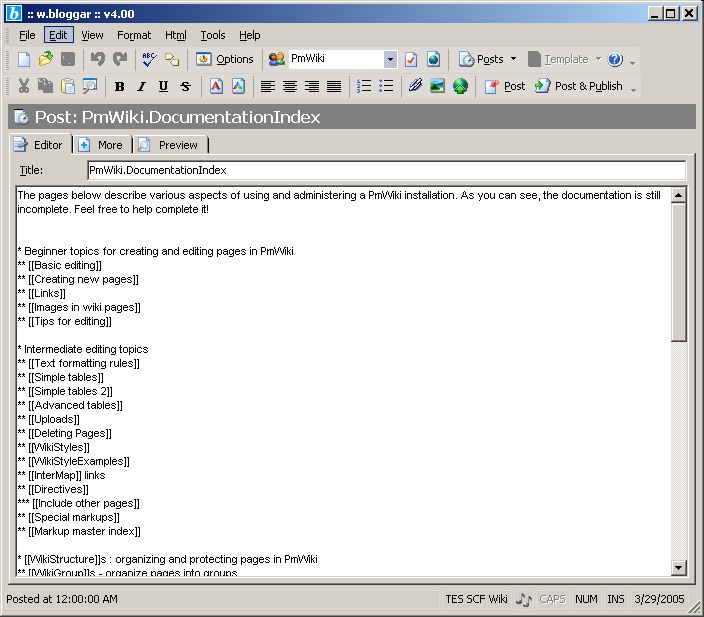
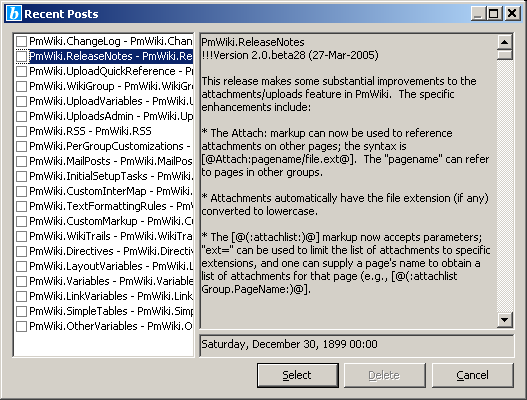
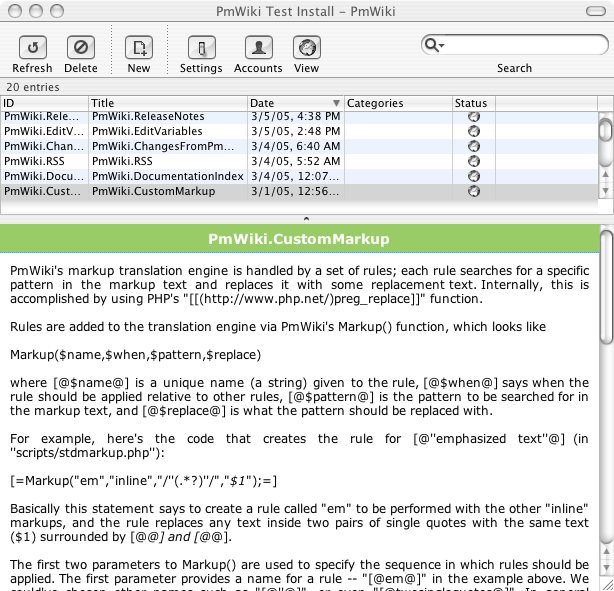
Use clients such as ecto (Mac OS X & Windows) or w.bloggar (Windows) to connect through this interface.
You can also use Zoundary Raven, another free blogging software (Windows).
Instruct the client you choose to connect to your PmWiki installation's URL with "?action=xmlrpc" appended to it. For instance, if the PmWiki website utilized this plugin (it currently does not) you would connect to the URL: "http://www.pmwiki.org/wiki/pmwiki.php?action=xmlrpc".
The username configured in the client is simply the Author name you usually use when editing. If you have password protected pages then use it when configuring the password in the client. Or, if you use UserAuth, use the password associated with your UserAuth username. However, if you do not use passwords or authentification then the password configured in the client can be any string. Most clients will complain if you leave the password field blank, so just put something like "nopass" in case you do not have protected pages.
When the Blogger client connects to PmWiki it will download a list of existing group names on the wiki. The group names will appear to the client as blog names. Existing pages in a group will show up as recent posts. Editing a page as a post and then publishing it should not require any special actions. However, when creating a new page using a Blogger client, the desired pagename needs to be specified in the title field of the client. The client w.blogger does not show the title field unless you configure the title tags <title> and </title> in the account setup. If your client does not have a separate title field then you will need to explicitly write something like this at the beginning of the page contents: "<title>Main.NewPageName</title>". If the Group.PageName semantic is not used and instead only a page name is specified in the title field then the page will be put into the group currently selected in the client.
VoodooPad Interface
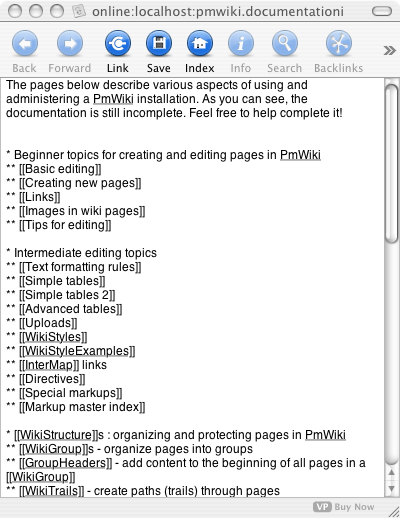
Connect to the VoodooPad interface using the same URL as described in the Blogger section above. Username and password setup also works the same way as the Blogger interface.
The VoodooPad interface uses the vpwiki api. The vpstash example was used to develop the PmWiki interface. The interface is read only for now because of problems with how VoodooPad sends the name of the page being posted. The program seems to use a lowercased version of pagenames as a key even though the PmWiki interface sends the pagename properly capitalized to the client. Additionally, there does not appear to be a way to determine the group of the page referencing a new page resulting in problems with the wrong page being retrieved when a group name is not explicit in a wiki link. Therefore, the VoodooPad interface might not always work as expected.
To navigate the wiki using VoodooPad you will most likely need to manually select links within the link bracket notation with your mouse and then press the link button at the top of the window.
Any help in figuring out how to get around VoodooPad's limitations is greatly appreciated.
Installation
Add the following line to your config.php file:
include_once('cookbook/xmlrpc.php');
Configuration
By default all interfaces are enabled. They can be turned off by setting the corresponding variable named below to 0 in your config.php before xmlrpc.php is included.
Interface usage varibles:
$UseBloggerInterface$UseVoodooPadInterface
For instance adding:
$UseBloggerInterface = 0;
will disable usage of the Blogger interface.
Screenshots
Click on image for bigger version.
w.bloggar
ecto

VoodooPad
History
- Version 0.1
- Initial version
- Version 0.2
- In blogger.php, fixed variable names in PostWikiPage that would cause postid to be returned when editing a page when it should be returning only a boolean
- Upgraded to CVS version of xmlrpc.in and xmlrpcs.inc
- Commented out line of code in xmlrpc.inc that was causing dumplicate &xxx; values in Php version 5+
- Changed xmlrpc.inc so that tabs, newlines and line feeds will not be converted into special characters
- Minor changes to voodoopad.php related to pagename keys with spaces
Notes
The way the code has been engineered will hopefully make it easy for further XML-RPC interfaces to be added. Please use the existing code as examples for writing new modules.
Ideas for the Future:
- Inter-wiki XML-RPC communications for:
- Publishing pages developed on a personal firewall protected wiki to a world accessible wiki
- Searching that spans wikis
When using Blogger clients, make sure to turn off any preprocessing or else the client might effect some of the markup on the page.
Comments
XES - This is terrific. I'm using Ecto as a software package on the Mac platform. What I'm wondering is why it only shows 20 journal/wiki entries. I see that Ecto thinks that Blogger imposes a 20 post limit. I've asked Ecto to give me the last 333 entries, but it still only shows 20. Is this a limit from Ecto, or from the XML-RPC implementation in the cookbook entries?
- Update: I reported the problem to the Ecto developer and Ecto now actually DOES allow more than 20 posts from a Blogger API feed. Ecto is also available on Windows. The program is a lifesaver with a larger wiki. I highly recommend it for wiki webmasters. XES
I tried many other blogging packages, and Ecto was the only one that saw past entries, and allows me to edit them. I'd also recommend DashBlog. It won't list past entries, or allow you to edit items already on the website. However, it's so easy to use to start a new page, has a slender profile, and of course the benefit of being on the dashboard, that I can't resist recommending it.
2005-12-28: It seems I can't get this working with UTF-8. ecto fails to read (or post) characters such as å, ä and ö.
2006-10-12: Has anybody tried this with the Performancing firefox plugin (see http://performancing.com/firefox)? I can login fine, it downloads the groups (i.e. Blogs), but publishing a page does not work (invalid server answer or something like that...) sts
2006-11-07: I was unable to properly use the XML-RPC library with non-ISO-8859-1 characters. However, after migrating my wiki to utf-8 encoding, everything seems to work fine. Moreover, you may want to upgrade the xml-rpc library for php to the most current version, which is available from http://phpxmlrpc.sourceforge.net/ (alef0)
2007-01-19: I was unable to use this in conjunction with either UserAuth - or AuthUser, tried as an alternative. Would someone care to upload a working config of either ? Chris Stiles
Smc: 2008-04-04: Clarification on usage with Ecto (perhaps a question for James or XES)
I've used PmWiki.2.0.beta.26 and the latest beta.65 out-of-the-box install plus this recipe on Windows XP Pro. I'm also using the latest Ecto for Windows and have failed to get the two talking properly. Would you please walk me through your configuration on how you have it working as I'm either missing something or we might have found a slight 'feature' that relates to different timezones/date formats? For your information, my Ecto Profile configuration (via the Wizard) is as follows; System: Other, API: Blogger, Access Point: http://localhost/pmwiki/pmwiki.php?action=xmlrpc
I've played with the 'API Type' setting and get different results as follows:
- with API type set to Blogger I get Ecto showing my Wiki Groups in the tree view but get the following error message: "Server Error: response contains invalid dateTime value [response : array mapped to type BloggerPost[] : element 0 : struct mapped to type BloggerPost : member dateCreadted mapped to type DateTime : dateTime]. I'm from the UK so perhaps the XML-RPC recipe assumes a US datetime format?
- with API type set to BloggerAtom I no longer get the Wiki Groups displayed in the tree view and get the following error message: "Server Error: Captcha required". This is very odd because the Wiki's are clean i.e. I've not put a separate captcha recipe on.
- with API type set to MoveableType I get Ecto showing my Wiki Groups in the tree view but get the following error message when I click on any of the Wiki Groups: "Server Error: unknown method"
The more I look at this I'm convinced it date/time related. I'm no PHP expert but it looks like blogger.php assumes a Unix time in ISO8601. Windoze might be returning some thing different which is then transposed in error as $lastmodified value.
Thanks in advance for any help.hasn't worked for me in quite a while, boy would I love for it to.... -- XES January 07, 2009, at 12:48 AM
Author
Copyright 2005 by James McDuffie, under the GNU GPL License
Isolating the problem with this recipe -- it must be php5 incompatible. I don't have a php4 server to try it on. I downloaded pmwiki-2.0.beta26 from subversion and tried it on my server. Same error. So it must be that it isn't php5 compatible right now. I don't have time to try to fix it right now. XES January 11, 2009, at 11:49 PM
The updates for the original package that James used are here: http://gggeek.github.io/phpxmlrpc/ -- in case anyone (myself included) has time to fix this recipe, it's been updated for PHP5. XES January 29, 2014, at 05:46 AM
User notes : If you use, used or reviewed this recipe, you can add your name. These statistics appear in the Cookbook listings and will help newcomers browsing through the wiki.