
Flipbox
Users: +7
Description
A simple way to update checklists and todo lists.
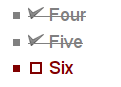
This recipe adds a new wiki markup -- [x] and [_] -- to create simple checkboxes 
 that can be flipped on-off or todo-done in your browser without editing the whole wiki page.
The state of the checkboxes will be saved asynchronously to the wiki page via a very small, micro-AJA(X) code.
A demonstration of the recipe can be seen and tested at the Flipbox homepage.
Installation
- Get flipbox.zipΔ (alt. download: flipbox.zip).
- Place the file
flipbox.phpin your/pmwiki/cookbook/directory. - Place the directory
flipboxin your/pmwiki/pub/directory. - Add to
config.phpthis line:
include_once($FarmD.'/cookbook/flipbox.php'); - Add to your
/pub/css/local.cssfile:
/** flipbox */
.fb_ { color: #800000; }
.fbx { color: #808080; text-decoration: line-through; }
.fbq { color: #ff8000; }
(you can adapt it for your needs).
Usage
In a wiki page, use the following markup:
[_]for an unchecked checkbox (todo, on)
[x]for a checked checkbox (done, off)
This markup will enable you to update the page by clicking on the checkbox image. The new checkbox state will be saved. Such a todo/checklist could be finished ("done") in a long time.
If you wish to only flip the checkboxes in your browser, without actually saving them in the page, use double "x" or underscore: [__] and [xx]. When you reload the page, you will find the previous state of the checklist. I use such checklists, for example, for things not to forget when going to the swimming pool.
To just display checkboxes without allowing readers to flip them, use triple "x" or underscore: [___] and [xxx].
You can test the recipe at the Flipbox homepage.
Locking all flipboxes in a page
You can "lock" all flipboxes in a page. Calling the page with a URL address followed by ?action=lockflipbox will convert all single flipboxes to triple ones and will thus freeze their state -- it will no longer be possible to flip them. With ?action=unlockflipbox you can convert them back to single flipboxes. This action requires edit permissions. Demo.
Configuration
The following code can be added to config.php before including the recipe:
$HandleAuth['flipbox'] = 'read';$FlipboxIcon= array("NAME", ".gif");NAME_.gifandNAMEx.gif, in the /pub/flipbox directory.$FlipboxPubDirUrl= '$FarmPubDirUrl/flipbox';
More states, icons and styles
From version 20090616, it is possible to define more flipbox states and styles, for example [q] for a question mark. To do this,
- create a new icon like the ones in the pub/flipbox directory, named
checkq.png, - add to your local css file some styling for the new
.fbqclass:
.fbq { color: #ff8000; } - add to config.php, again before including the recipe, such a line:
$FlipboxChoices= '_xq';
this way you can have in your page[_], [x], or [q]as flipboxes.
You can have other letters or numbers like [w], [o], [1] etc., just add them in the $FlipboxChoices variable. Note that you cannot have other symbols like '?', '!', '.' etc.
The demo page uses the [q] flipbox for an orange question mark.
Notes
- "Editable" flipboxes on included pages or sections will not flip.
- JavaScript needs to be enabled in a recent browser, for the checkboxes to be flippable.
- The flipbox colors and styles work best in bulleted or numbered lists.
Release Notes
- 20240918 update for PHP 8.2, reported by Martin.
- 20190908 update for PHP 7.4
- 20190717 update for PHP 7.2 compatibility, requires PmWiki 2.2.58 or newer.
- 20150102 update for PHP 5.5 compatibility
- 20111008 added a template variable for
$FlipboxHTML. - 20110827 fixed an icon alt attribute, the lack of which caused HTML validation errors.
- 20110824 fixed a function incompatibility with the library.
- 20110813 added actions (un)lockflipbox.
- 20100211 added
$FlipboxHTMLto allow custom HTML markup instead of the default images. - 20090616 added
$FlipboxChoicesand a sample question icon (suggested by Johannes Schneider) - 20090128 fixed history bug, reported by mzuther.
- 20081026 fixed change summaries in page history while flipping checkboxes.
- 20081020c "editable" flipboxes from other pages are now disabled and cannot be flipped.
- 20081020 fixed escaped or conditional markup
- 20081019 first release, ready to be tested.
See Also
- Cookbook /
- Checklists Ephemeral to-do lists (Beta)
- FoxSimpleTodoList An example of how to use Fox to setup a simple 'todo list'. (Functional)
- GTD-TLM An experimental JavaScript GTD task/todo list manager (experimental)
- ToDo A nice looking ToDo list ([unknown])
- VerySimpleToDo A very simple ToDo list
Contributors
- The recipe is written and maintained by Petko (5ko [snail] 5ko [period] fr).
- If this recipe helps you or saves you time, you can help support its continued development by ♥ .
Comments
Your comments are welcome.
User notes +7: If you use, used or reviewed this recipe, you can add your name. These statistics appear in the Cookbook listings and will help newcomers browsing through the wiki.