
Cookbook /
TableCalc
Summary: Enhance PmWiki tables with spreadsheet like capabilities
Version: 1.0
Prerequisites: recommended supported PHP version 8.4 or newer
Status: Working
Maintainer: GNUZoo
Discussion: TableCalc-Talk
Categories: Tables
Downloads: tblcalc.phpΔ
Discussion: TableCalc-Talk
Installing
This was programmed using Ubuntu 24.02 in Firefox.
Copy tblcalc.phpΔ to your cookbook directory
In your config.php enter:
include_once("cookbook/tblcalc.php");
or in your farmconfig.php enter:
include_once("
$FarmD/cookbook/tblcalc.php");
================================================================================
                         PMWIKI TABLE CALC MANUAL
================================================================================
TBLCALC is not a spreadsheet application; rather, it is a specialized
extension that adds spreadsheet-like functionality to standard PmWiki
tables. It allows for reactive data, dynamic inputs, and financial logic.

--------------------------------------------------------------------------------
1. CORE MARKUP & EXPRESSION SYNTAX
--------------------------------------------------------------------------------
Syntax: (:tblcalc [outputformat] [expression] :)

This directive displays the result of an expression.

[outputformat] (Optional):
  finance  : Formats as currency (e.g., $1,234.56).
  percent  : Displays as a percentage (e.g., 15%).
  float1-4 : Fixed decimal precision (e.g., float1, float2, float3, float4).
  int      : Rounds to the nearest whole number (Default).

[expression]:
  - Cell Refs:  A1, B5, etc.
  - Ranges:     A1:B10 (used with functions like sum or avg).
  - Variables:  Reference any 'input' or 'var' by its tblcalc_ name.
  - Functions:  sum (adds a range), avg (averages a range).
  - Operators:  +, -, *, / and parentheses ( ) for grouping.
  - Percents:   You can use the % symbol in expressions (e.g., A1 * 15%).
  - Context:    Use 'tbl 2' or 'tblid MyTable' before a cell reference to
                pull data from a specific table.

--------------------------------------------------------------------------------
2. INTERACTIVE PREDEFINED INPUT METHODS
--------------------------------------------------------------------------------
Inputs allow users to change values live. The program provides two predefined
methods optimized for data entry:

- FINANCE INPUTS ($): Use 'type=finance'. The input box automatically formats
  currency entry and treats values as fixed-point integers.
- PERCENT INPUTS (%): Use 'type=percent'. The program treats these as
  fractions of 100 during calculations.

STRICT RULE: Every 'name' MUST start with the prefix 'tblcalc_'.

Example: (:tblcalc input name=tblcalc_unit_cost type=finance caption="Cost" :)

Other tblcalc values derived from these inputs are immediately updated

--------------------------------------------------------------------------------
3. STATIC VARIABLES
--------------------------------------------------------------------------------
Syntax: (:tblcalc var name=tblcalc_NAME value="NUMBER" :)

Defines a constant variable (like a tax rate or fixed fee) that is used in
expressions but remains hidden from the reader.

STRICT RULE: The 'name' MUST start with 'tblcalc_'.

--------------------------------------------------------------------------------
4. THE GRID: VISUAL COORDINATES
--------------------------------------------------------------------------------
Syntax: (:tblcalc toggle_grid:)

The Grid is a development tool used only in VIEW mode to make creating
markup easier. It provides red Excel-style labels (A, B, C... / 1, 2, 3...).

WORKFLOW:
1. View the page and click Grid link  - Red labels will appear.
2. Open a second browser tab to edit the page.
3. Use the first tab to see that your "Total" is in cell C15.
4. Update your markup in the second tab: (:tblcalc sum C1:C14 :)
5. FORCE REFRESH: Always use CTRL+F5 after saving to ensure the web page
   fully reloads the program with your new coordinates.

The Grid Ruler link (:tblcalc toggle_grid:) does not have to be
shown - you can comment it out or delete it.  It is a useful tool.

--------------------------------------------------------------------------------
5. REVIEW OF SYNTACTICAL EXAMPLES
--------------------------------------------------------------------------------
Understanding how the program parses the markup:

EXAMPLE A: Minimalist Expression
  (:tblcalc A1 + B1 :)
  - Output Format: Without an output format it defaults to int.
  - Expression: Adds the values in cells A1 and B1.

EXAMPLE B: Using Percentages
  (:tblcalc finance tblcalc_total * 15% :)
  - Keyword 'finance': Triggers currency display.
  - Expression: Multiplies a variable by fifteen percent.

EXAMPLE C: Complex Multi-Table Expression
  (:tblcalc finance (sum tbl 1 A1:A10) + (sum tbl 2 A1:A10) :)
  - Expression: Sums range A1:A10 from the first table and adds it to the
    sum of A1:A10 from the second table.

EXAMPLE D: Table IDs
  (:tblcalc tblid MyTable B5 * 2 :)
  - Expression: Multiplies cell B5 from the table with HTML ID "MyTable" by 2.

--------------------------------------------------------------------------------
6. THE PROGRAM: FIXED-POINT PRECISION
--------------------------------------------------------------------------------
Standard computer math uses "Floating Point" logic, which can cause tiny but
disastrous rounding errors in financial reports (e.g., $0.10 + $0.20 resulting
in $0.300000004).

TBLCALC prevents this by using FIXED-POINT ARITHMETIC:
- Internal Scaling: Every financial amount and decimal is automatically
  multiplied by 100 upon entry.
- Integer Logic: The program performs all additions, subtractions, and sums
  using these large whole integers.
- Re-Scaling: Only when the calculation is finished is the result divided back
  by 100 for display.

This ensures that your "Bottom Line" is always accurate to the cent, making
it highly reliable for invoices, budgets, and tax calculations.

--------------------------------------------------------------------------------
7. OVERWRITE LOGIC & ERRORS
--------------------------------------------------------------------------------
- DUPLICATES: If you define 'tblcalc_tax' twice, the program ignores the first
  one and uses the value of the LAST occurrence on the page.
- PREFIX ERROR: If a name is not prefixed properly, a red error will appear:
  "tblcalc [var/input] name must start with 'tblcalc_' - the current name is
  'BADNAME'."
================================================================================
Very Simple Table
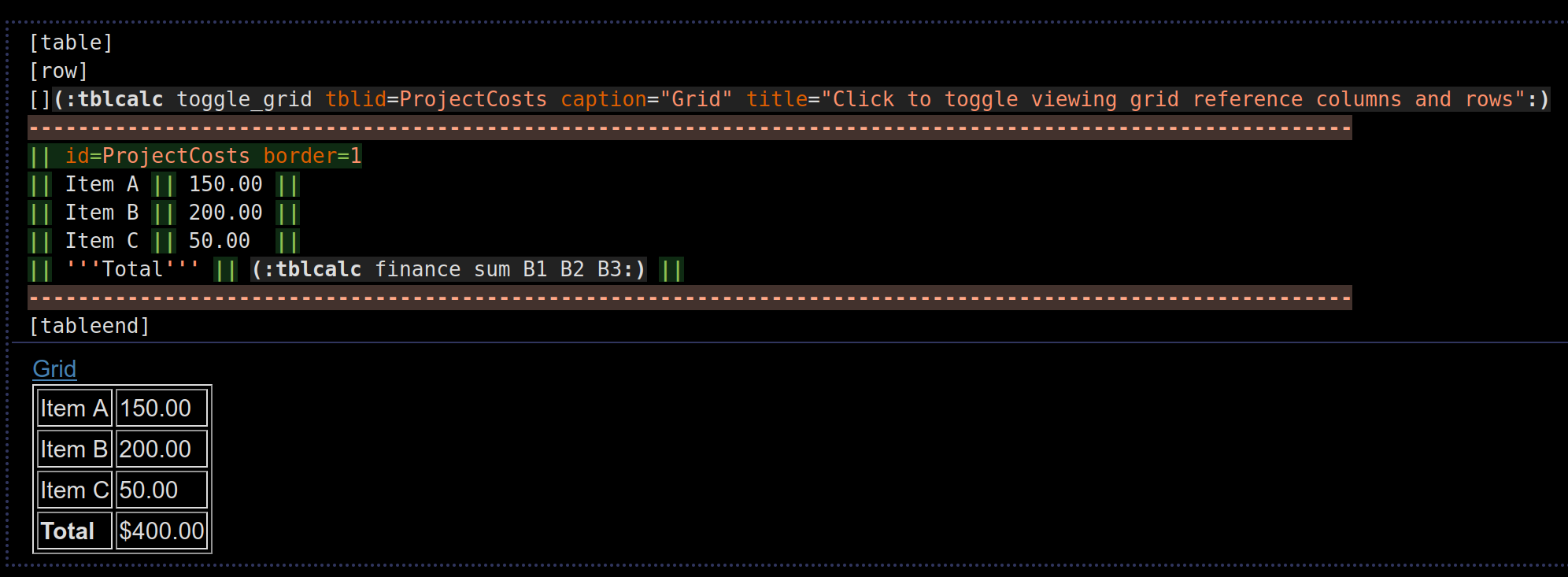
More Complex Tables With An Input
PmWiki Page Code:
----
(:tblcalc input name=tblcalc_input_stockprice type=finance default=440 caption="Stock Price" height=30px inputheight=20px width=200px inputwidth=100px title="Enter stock price - the table will auto update":)
-----------------------------------------------------------------------------------------------------------
[table]
[row]
[](:tblcalc toggle_grid tblid=Stocks caption="Grid" title="Click to toggle viewing grid reference columns and rows":)
[table id=Stocks class=zebra border=1]
-----------------------------------------------------------------------------------------------------------
[row]
[!c tradenumber       ]Trade #
[!c tradedate         ]Trade Date
[!c shares            ]# Shares
[!c costpershare      ]Cost Per Share
[!c cost              ]Cost
[!c split1            ]5-1 Split Aug 31, 2020
[!c split2            ]3-1 Split Aug 25, 2022
[!c totalshares       ]Total Shares
[!c investmentpershare]Investment Per Share
[   bgcolor=lightgray ]
[!c value             ]Value
[!c capitalgain       ]Capital Gain
[!c x                 ]X
------------------------------------------------------------------------------------------------------------
[row]
[!c tradenumber       ]1
[c  tradedate         ]Jul 2, 2019
[r  shares            ]15
[r  costpershare      ]$224.91
[r  cost              ]%red%*%%(:tblcalc finance C2 * D2:)
[r  split1            ](:tblcalc C2 * 5:)
[r  split2            ](:tblcalc F2 * 3:)
[r  totalshares       ](:tblcalc G2:)
[r  investmentpershare](:tblcalc finance E2 / H2:)
[r  bgcolor=lightgray ]
[c  value             ](:tblcalc finance H2 * tblcalc_input_stockprice:)
[c  capitalgain       ](:tblcalc finance K2 - E2:)
[c  x                 ](:tblcalc float2  K2 / E2 :) x
------------------------------------------------------------------------------------------------------------
[row]
[!c tradenumber       ]2
[c  tradedate         ]Aug 28, 2019
[r  shares            ]15
[r  costpershare      ]$215.93
[r  cost              ](:tblcalc finance C3 * D3:)
[r  split1            ](:tblcalc C3 * 5:)
[r  split2            ](:tblcalc F3 * 3:)
[r  totalshares       ](:tblcalc G3:)
[r  investmentpershare](:tblcalc finance E3 / H3:)
[r  bgcolor=lightgray ]
[c  value             ](:tblcalc finance H3 * tblcalc_input_stockprice:)
[c  capitalgain       ](:tblcalc finance K3 - E3:)
[c  x                 ](:tblcalc float2  K3 / E3 :) x
------------------------------------------------------------------------------------------------------------
[row]
[!c tradenumber       ]3
[c  tradedate         ]Jul 21, 2020
[r  shares            ]5
[r  costpershare      ]$1,610.00
[r  cost              ](:tblcalc finance C4 * D4:)
[r  split1            ](:tblcalc C4 * 5:)
[r  split2            ](:tblcalc F4 * 3:)
[r  totalshares       ](:tblcalc G4:)
[r  investmentpershare](:tblcalc finance E4 / H4:)
[r  bgcolor=lightgray ]
[c  value             ](:tblcalc finance H4 * tblcalc_input_stockprice:)
[c  capitalgain       ](:tblcalc finance K4 - E4:)
[c  x                 ](:tblcalc float2  K4 / E4 :) x
------------------------------------------------------------------------------------------------------------
[row]
[!c tradenumber       ]4
[c  tradedate         ]Mar 5, 2021
[r  shares            ]5
[r  costpershare      ]$547.72
[r  cost              ](:tblcalc finance C5 * D5:)
[r  split1            ]
[r  split2            ](:tblcalc C5 * 3:)
[r  totalshares       ](:tblcalc G5:)
[r  investmentpershare](:tblcalc finance E5 / H5:)
[r  bgcolor=lightgray ]
[c  value             ](:tblcalc finance H5 * tblcalc_input_stockprice:)
[c  capitalgain       ](:tblcalc finance K5 - E5:)
[c  x                 ](:tblcalc float2  K5 / E5 :) x
------------------------------------------------------------------------------------------------------------
[row]
[!c tradenumber                         ]Totals
[r  tradedate          bgcolor=lightgray]
[r  shares             bgcolor=lightgray]
[r  costpershare       bgcolor=lightgray]
[!r cost                                ](:tblcalc finance sum E2:E5 :)
[!r split1                              ](:tblcalc sum F2 F3 F4:)
[!r split2                              ](:tblcalc sum G2:G5 :)
[!r totalshares                         ](:tblcalc sum H2:H5 :)
[!r avg investmentpershare              ]Avg (:tblcalc finance avg I2:I5 :)
[r                     bgcolor=lightgray]
[!r value                               ](:tblcalc finance H6 * tblcalc_input_stockprice:)
[!r capitalgain                         ](:tblcalc finance K6 - E6:)
[!r avg x                               ]Avg (:tblcalc float2 avg M2:M5:) x
[tableend]
[tableend]
------------------------------------------------------------------------------------------------------------
----
Summary Table References Previous Table
[table]
[](:tblcalc toggle_grid tblid=Calculations caption="Grid" title="Click to toggle viewing grid reference columns and rows":)
[table id=Calculations class=zebra border=1]
-----------------------------------------------------------------------------------------------------------
[row]
[!c item  ]Item
[!c amount]Amount
-----------------------------------------------------------------------------------------------------------
[row]
[  item  ]Capital Gains Tax %red%20%
[r amount](:tblcalc finance tblid Stocks L6 * 20%:)
-----------------------------------------------------------------------------------------------------------
[row]
[  item  ]ACA Tax %red%3.8%
[r amount](:tblcalc finance tblid Stocks L6 * 3.8%:)
-----------------------------------------------------------------------------------------------------------
[row]
[  item  ]Total Taxes %red%23.8%
[r amount](:tblcalc finance B2 + B3:)%%
-----------------------------------------------------------------------------------------------------------
[row]
[  item  ]Net Capital Gains
[r amount](:tblcalc finance - tblid Stocks L6 - 23.8%:)
-----------------------------------------------------------------------------------------------------------
[row]
[  item  ]Net Capital Gains Plus Cost
[r amount](:tblcalc finance tblid Stocks E6 + tblid Calculations B5:)
-----------------------------------------------------------------------------------------------------------
[tableend]
[tableend]
-----------------------------------------------------------------------------------------------------------
----
Resulting Output:

Output Shows Grid After Clicking Link:

See Also
Contributors
Comments
See discussion at TableCalc-Talk
User notes : If you use, used or reviewed this recipe, you can add your name. These statistics appear in the Cookbook listings and will help newcomers browsing through the wiki.