
InlineDiff
Description
PmWiki's built in function for page history currently shows a comparison between each 2 lines of 2 versions, but without any highlighting. If the lines are long and the changes small, it is sometimes very difficult to see what actually changed.
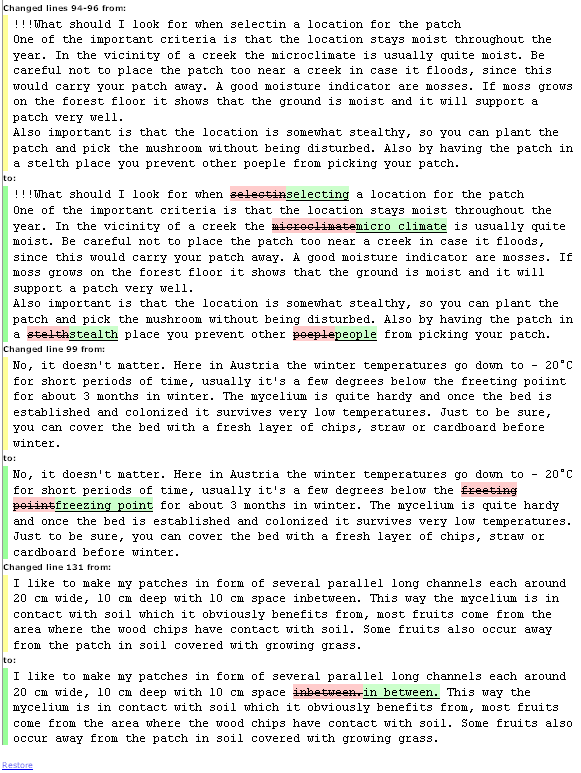
This recipe integrates the http://pear.php.net/package/Text_Diff package into the PmWiki original function to provide the highlighting so one can immediately spot the differences. You have to press "Show changes to markup" on the history page, to see the highlighting.
Example of markup highlighting:
Installation
1. Extract the contents of the pagerevinline20100203.zipΔ file to the cookbook/ folder, preserving the directory structure:
 cookbook/pagerevinline/pagerevinline.php
                       /Text/Diff.php
                            /Diff/Renderer.php
                                 /Renderer/inline.php
                                 /Engine/native.php
2. Add this to your local/config.php file:
 if ($action=='diff')
	include_once("$FarmD/cookbook/pagerevinline/pagerevinline.php");
If you would like to default to the markup view in the page history, add these lines instead:
if(!isset($_REQUEST['source']))$DiffShow['source'] ='y'; if ($action=='diff') include_once("$FarmD/cookbook/pagerevinline/pagerevinline.php");
(This exact sequence is important in order for the "Show changes to markup/preview" links to work properly.)
Notes
From version 2.2.12, PmWiki contains a built-in word-level difference highlighter. See $EnableDiffInline.
Release Notes
- 2010-02-03 (pagerevinline20100203.zipΔ): Incorporated improvements by Eemili Aro (2009-06-09) and Rogutes (2009-11-11). Added
$DiffGMTvariable support to allow linking to particular diffs in history page. Rik Blok February 04, 2010, at 01:20 AM - 2008-01-17 v1.2 (pagerevinline1.2.zipΔ): Implemented the improvements by Petko and EemeliAro, and upgraded to Text_Diff-0.3.2
- 2007-05-14 v1.1 (pagerevinline1.1.zipΔ): Upon suggestion of Scott the recipe now uses the
$FarmDvariable throughout the files
Integration with Limit Diffs Per Page
From 2008-11-16 on, this recipe can be automatically integrated with the Limit Diffs Per Page recipe. To do it, copy the InlineDiff dirs/files to the cookbook/pagerevinline and install LDPP. --Petko
Comments
See Discussion at InlineDiff-Talk
See Also
Contributors
User notes +5: If you use, used or reviewed this recipe, you can add your name. These statistics appear in the Cookbook listings and will help newcomers browsing through the wiki.