
HorizontalVerticalMenu
Description
This script provides additional markup for easy generation of multilevel horizontal and vertical menus. (This technique is also used with the advanced version of the DropDownSkin. Advanced means that it provides special markup). I took the idea from here and here and just optimised it and changed it so it can be used with PmWiki.
Available Markup (see also examples)
(:hmenu:)- begins a horizontal menu. Available options are
up(opens the menu upwards) andleft(open menu to the left). These options can be combined, e.g(:hmenu up left:). (:vmenu:)- begins a vertical menu. Same options as with
hmenuavailable. (:newmenu:)- needed for separation of main menu items (mainly when using hmenu)
(:emenu:)- begin expanded menu. Availbale options are
up(no floating) andleft(text is written left of the menu) *- menuitem (same as bullet list)
* ----- separator line (should be placed after any submenues)
(:menuend:)- end the menu
Files and Installation
- HV-menu-2026-06-01.zipΔ for recent PHP and PmWiki versions.
- Older version: menus.zipΔ
Simply extract this ZIP file into the PmWiki directory and insert the following line into your config.php:
include_once('cookbook/menus.php');
Now you can create menus whereever you want.
Examples
Horizontal menu:
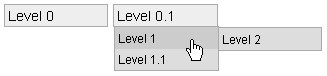
(:hmenu:) *Level 0 (:newmenu:) *Level 0.1 **Level 1 ***Level 2 **Level 1.1 (:menuend:) |
Vertical menu:

(:vmenu:) *Level 0 **Level 1 ***Level 2 **Level 1.1 *Level 0.1 (:menuend:) |
Expanded menu:
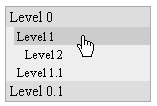
(:emenu:) *Level 0 **Level 1 ***Level 2 **Level 1.1 *Level 0.1 (:menuend:) |
See a live example here
Dynamically Generated with Pagelists
This makes a nice big menu of backlinks all the way up to the page that has a menu. Note the strangeness in it's construction...
My menu:
(:vmenu:)
(:pagelist link={$Name} fmt=#sb1:)
(:menuend:)
My pagelist template
[[#sb1]]
(:template defaults order=title:)
*[[{=$FullName}|{=$Titlespaced}]](:pagelist link={=$FullName} fmt=#sb2:)
[[#sb1end]]

[[#sb2]]
(:template defaults order=title:)
*[[{=$FullName}|{=$Titlespaced}]](:pagelist link={=$FullName} fmt=#sb3:)
[[#sb2end]]

[[#sb3]]
(:template defaults order=title:)
*[[{=$FullName}|{=$Titlespaced}]](:pagelist link={=$FullName} fmt=#sb4:)
[[#sb3end]]

[[#sb4]]
(:template defaults order=title:)
*[[{=$FullName}|{=$Titlespaced}]]
[[#sb4end]]
Limitations
- If you want to change the CSS file always use colored backrounds for
menuitem,menutitle, otherwise the menu won't work correctly within IE. - As IE also only recognizes
:hoverwith links you need thecsshover.htcfile, which gives IE the ability to recognize. I included it into the ZIP file but you can get always the newest version here: http://www.xs4all.nl/~peterned (whatever:hover). There migth occur a problem with this file with Win XP2. The server must deliver the mime-typetext/x-componentfor.htcfiles. - With the actual CSS file up to 5 levels are possible
Bugs
- not known
History
- 2026-06-01 update for recent PHP and PmWiki versions, add
$RecipeInfo(Petko). - 18-Oct-2015 changed markup calls so no deprecated errors with PHP 5.5 occur, requires PmWiki > 2.2.58 Klonk
- 19-Jan-2008 bug fix... MikeShanley
- 28-Mar-2007 added (:emenu:) markup - Expanded menu, separator is now also possible within main menu (should not be used in main hmenu)
- 20-Mar-2006 updated to newest version of csshover.htc (1.42) Klonk
- 30-Sep-2005 updated to newest version of csshover.htc Klonk
- 10-Mar-2005 major rewrite to remove new markup and use standard markup
*(bullet list) instead Klonk - 23-Feb-2005 fixed difference in display between IE and FireFox, added possibility to change the way the menu opens. Klonk
- 19-Feb-2005 improved compatibility with wikistyles Klonk
- 18-Feb-2005 minor design update Klonk
Contributors
Comments
See discussion at HorizontalVerticalMenu-Talk
User notes : If you use, used or reviewed this recipe, you can add your name. These statistics appear in the Cookbook listings and will help newcomers browsing through the wiki.