
SiteMapsWithOptions
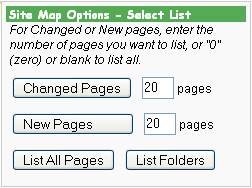
image of user options
Questions answered by this recipe
How to implement a Site Map option for users of your website.
Description
Users first get a listing of Groups on the site (called "Folders" here). Users can then optionally list most recent changed pages, most recent new pages, or all pages.
The recipe takes advantage of the (:pagelist:) directive.
There are five parts to this recipe:
- The pagelist template
- The SiteMap page markup
- Set pagelist list definition
- Set custom page variables
- Provide a link on your skin for the sitemap
The Pagelist Template
In Site.LocalTemplates (in your wiki.d directory), add the following template:
[[#sitemap]]
(:if ( ! equal {=$Group} {<$Group} ) && ( ! equal {=$Group} {=$DefaultGroup} ) :)
:[[{=$Groupspaced}/]] /:
(:if:)
(:if ( ! equal {=$Group} {<$Group} ) && ( equal {=$Group} {=$DefaultGroup} ) :)
:[[{=$Groupspaced}/]] (Main Folder) /:
(:if:)
: :[[{=$Group}/{=$Name} | {=$Titlespaced}]](:if equal {=$Name} {$DefaultName}:) (Folder Main Page)(:ifend:)\\
%green%[-''created:'' {=$PageCreatedDate}; ''modified:'' {=$PageModifiedDate}-]%%(:if ! equal {=$Description} '':)\\
%green%''Description: ''%%{=$Description}(:if:)
(:if equal {>$Group}:)'''Pages Listed:''' {$PageCount}(:if:)
[[#sitemapend]]
There are any number of ways of doing this. This particular approach presents group names, titles, created and modified dates, and a description if available.
It also gives the number of pages listed at the bottom.
Note that $PageCreatedDate and $PageModifiedDate are custom Page Variables.
The SiteMap page markup
Add the following wiki markup to Site.SiteMap (in your wiki.d directory):
(:div class="frame rfloat" style="width:240px":)
!!!!!!Site Map Options - Select List
''For Changed or New pages, enter the number of pages you want to list, or "0" (zero) or blank to list all.''
(:input form "{$ScriptUrl}/{$FullName}" GET:)
(:table:)
(:cellnr:)
(:input hidden sitemapoption "changedpages":)
(:input hidden name "":)
(:input hidden order "-time,group,title":)
(:input submit value="Changed Pages":)
(:cell:)
(:input text count value="20" size=1:) pages
(:tableend:)
(:input end:)

(:input form "{$ScriptUrl}/{$FullName}" GET:)
(:table:)
(:cellnr:)
(:input hidden sitemapoption "newpages":)
(:input hidden name "":)
(:input hidden order "-ctime,group,title":)
(:input submit value="New Pages          ":)
(:cell:)
(:input text count value="20" size=1:) pages
(:tableend:)
(:input end:)

(:table:)
(:cellnr:)
(:input form "{$ScriptUrl}/{$FullName}" GET:)
(:input hidden sitemapoption "allpages":)
(:input hidden name "":)
(:input submit value="List All Pages":)
(:input end:)
(:cell:)
(:input form "{$ScriptUrl}/{$FullName}" GET:)
(:input hidden sitemapoption "folders":)
(:input hidden name "{$DefaultName}":)
(:input submit value="List Folders":)
(:input end:)
(:tableend:)
(:divend:)

!!!Site Map for {$SiteName}

!!!!!{$SiteMapHeading}

(:pagelist list=sitemaplist fmt=#sitemap name={$DefaultName} request=1:)
This markup creates titles, forms for providing the user with listing options, and the listing itself.
- The submit buttons add parameters to the url action, which override the
(:pagelist:)settings on the form, and inform the server which option has been selected by the user. (:pagelist:)uses the above defined #sitemap template, and a custom filter list namedsitemaplist(see below).{$SiteName}and{$SiteMapHeading}are custom page variables.
Set Pagelist List Definition
Place the following code in your config.php file. Modify the definition to suit your needs.
$SearchPatterns['sitemaplist'][] = '!^PmWiki\.!';
$SearchPatterns['sitemaplist'][] = '!^Site\.!';
$SearchPatterns['sitemaplist'][] = '!^Main\.!';
$SearchPatterns['sitemaplist'][] = '!\\.(All)?Recent(Changes|Uploads)$!';
$SearchPatterns['sitemaplist'][] = '!\\.GroupAttributes$!';
$SearchPatterns['sitemaplist'][] = '!\\.Group(Print)?Header$!';
$SearchPatterns['sitemaplist'][] = '!\\.Sidebar$!';
This list is used by (:pagelist:) in the SiteMap form.
Set Custom Page Variables
In Site.SiteMap.php (in your local/ directory), add the following:
<?php
global $FmtPV;
$FmtPV['$PageCreatedDate'] = 'strftime("%B %d, %Y", $page["ctime"])';
$FmtPV['$PageModifiedDate'] = 'strftime("%B %d, %Y", $page["time"])';
$FmtPV['$SiteName'] = "'My Site Name'";
$sitemapoption=$_GET["sitemapoption"];
if (!$sitemapoption) $sitemapoption='folders';
switch ($sitemapoption) {
	case 'folders': $maptitle='Listing of Folders' ; break;
	case 'changedpages': $maptitle= 'Listing by Changed Pages'; break;
	case 'newpages': $maptitle='Listing by New Pages' ; break;
	case 'allpages': $maptitle='All Pages'; break;
}
$FmtPV['$SiteMapHeading'] = "'" . $maptitle . "'";

?>
This sets the page variables for use in the pagelist template and the SiteMap headings.
Provide a link on your skin for the sitemap
Place the following in your menu sidebar:
[[(Site.)Site Map]]
or add the link directly to your skin template file (.tmpl), for example:
<a href='$ScriptUrl/Site.SiteMap'>Site Map</a>
Notes
A useful refinement will be when PmWiki 2.2 is released, to be able to sort by date rather than time. This will avoid odd listing orders for days of high edit and creation activity.
Release Notes
Comments
You may want to use:
$FmtPV['$SiteName'] = "'$WikiTitle'";
Also, (:pagelist:) directives now require request=1 to accept input from the URL (changed above!) -- otherwise the form doesn't work to change the pagelist.
See Also
Contributors
User notes : If you use, used or reviewed this recipe, you can add your name. These statistics appear in the Cookbook listings and will help newcomers browsing through the wiki.