
PHP
Questions answered by this recipe
How do I install PHP for PmWiki on Windows?
What configuration changes may be made to PHP to work better with PmWiki? 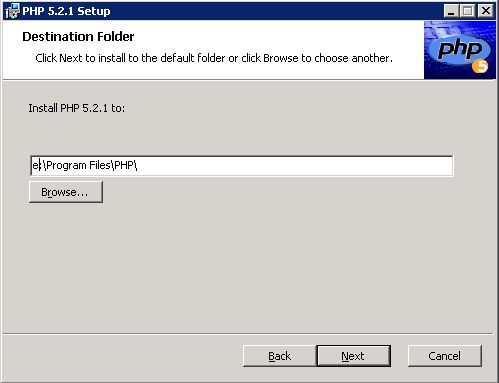
This information is intended for people who have administrator access to their computer and may have installed PHP to run PmWiki. They may be using PmWiki for an intranet, or for a personal website.
Description
The PHP versions needed for PmWiki are described in Requirements. PmWiki will work out of the box without any changes to PHP.
Installation
Use the Microsoft Web platform installer
- install Fast CGI for IIS6
- install PHP
Prior to installing PHP the latest version (5) of the installer (.msi) should be obtained from http://php.net/downloads.php. You may also wish to download the documentation from http://www.php.net/download-docs.php.
Introduction
- on the server run the installer.
- set the Destination folder to your applications drive
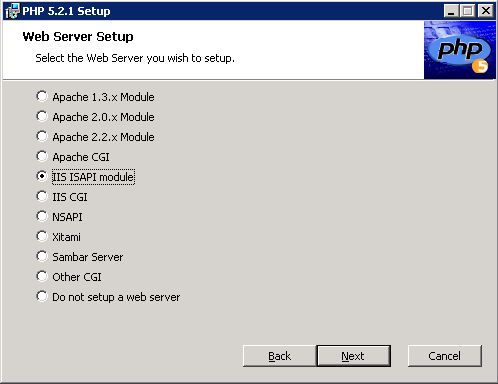
- select the webserver setup - IIS API module
- choose items to install
- choose EXIF, GD2, IIS administration, imagick, mailparse in addition to the defaults
- click Install to finish
Fine tuning
These notes provide some guidance for changes that can be made to the runtime configuration file php.ini
to facilitate, say, cookbook recipes that carry out image processing,
or scripts that require sessions for authentication.
Change to the php.ini file (usually /etc/php.ini or /usr/local/lib/php.ini) and downloads of additional components may be required.
If php.ini is altered generally the http server must restarted.
Windows Notes
Sites running PHP under Windows may not have PHP's mail function configured correctly. Such sites may need to add a line like
to config.php, where smtp.server.com is the name of your host's preferred outgoing mail server. You may also need to set the sendmail_from value if that is not configured:
PHP 4 not recommended, no longer supported
- Resource Limits
If you are image processing, or have an older slower machine, you could consider changing
max_execution_time = 45 ;Maximum execution time of each script, in seconds (normally 30)memory_limit = 12M ; Maximum amount of memory a script may consume (normally 8MB)
- Paths and Directories
You may also need to check your setting for extensions is correct
extension_dir = "x:\php\extensions" ; Directory in which the loadable extensions (modules) reside.
- Windows Extensions
You may need to enable the gd2 if using an image recipe
extension=php_gd2.dll
- Error handling and logging
It is recommended that you log errors to monitor your settings and check for processing problems
log_errors = On ; Log errors into a log file (server-specific log, stderr, or error_log (below))
PHP 5
PHP any version
- if uploads don't seem to work, make sure that
file_uploads = On
Release Notes
Comments
See Also
Contributors
User notes : If you use, used or reviewed this recipe, you can add your name. These statistics appear in the Cookbook listings and will help newcomers browsing through the wiki.