
Images-Talk
Examples show captions beneath an image and on the right side. Is there a way to show a caption on top of an image?
I use a tiny 8 x 8 svg icon just to the right side of links when they open in a new window.
I always apply the style "%height=8px width=8px%" before displaying it.
I cannot upload it to PmWiki, but clearly the browsers can display them. I have tried
to convert it to png using screen capture, imagemagick, and inkscape and other methods.
The converted images look like crap compared to using the original svg file. Did I read
somewhere on the PmWiki website that they are a security risk? If so, is it ironic that
the beautifully done PmWiki Logo is an svg file?
On my localhost I named it "x.svg" - meaning external. I use it all over the place to
know a link is external or not.
I tried uploading on pmwiki as "external.svg". It did not accept it.
Here is the content of the file:
---------------------------------
<?xml version="1.0" encoding="UTF-8"?>
<svg xmlns="http://www.w3.org/2000/svg" width="12" height="12" viewBox="0 0 12 12">
        <title>
                external link
        </title>
        <path fill="#36c" d="M6 1h5v5L8.86 3.85 4.7 8 4 7.3l4.15-4.16zM2 3h2v1H2v6h6V8h1v2a1 1 0 0 1-1 1H2a1 1 0 0 1-1-1V4a1 1 0 0 1 1-1"/>
</svg>
---------------------------------
Can I/we upload this? It it a security risk?
--gnuzoo
I made a similar file myself,  because I wasn't sure that the copyright holder of the above has released it under an open source license permitting redistribution. Petko
Yours is the wrong color. I got this off some free art website somewhere years ago.
Can you please adjust the color to match? I think it is "#36c"
Testing image at 8px x 8px ---> 
--gnuzoo
Added external-36c.svg. Petko
This works but I want do not have to repeat the same filename for the same image.
%height=200px%[[Attach:giant_crystals.jpg|Attach:giant_crystals.jpg"Click for full size image"]]
I am trying to use syntax like this:
%height=200px%[[Attach:giant_crystals.jpg|<link>"Click for full size image"]]
My regex does not work.
# eliminate need to repeat same filename when it links to itself
Markup('link_shortcut', '<links', '/\[\[([^|\]]+)\|\s*<link>(.*?)\]\]/', '[[$1|$1$2]]');
Can someone please help me adjust this?
--gnuzoo
I haven't tested it but at this point of the processing you probably have "<link>" instead of <link>. Petko
🦸♂️ Super Petko to the rescue again! See - Thumbs
Here is the newer markup:
# eliminate need to repeat same filename when it links to itself
Markup('link_shortcut', '<links', '/\[\[([^|\]]+)\|\s*<link>(.*?)\]\]/', '[[$1|$1$2]]');
Perhaps a new kind of official markup might be added to the core adding
"link image to self". I used '<link>' because I felt it would be unique
enough. Maybe just 2 vertical bars could mean link to self '||'.
Hopefully adding this functionality to a link would not interfere with
normal links that already exist. Maybe something like this:
%newwin height=100px%[[Attach:filename.jpg||"Click image to see it fullsize."]]
--gnuzoo
PmWiki shows you can display an image with just a reference to the URL.
If I click the image it shows the full image - that is great!
If a space is in the filename it and you want to use a tooltip and/or captions it becomes
either not clickable or the tooltip and caption do not work.
clickable - not using tooltip or caption, shows original image at full resolution - works great
%newwin height=100px%https://www.pmwiki.org/pmwiki/uploads/Cookbook/[=marine corps.gif=] |
https://www.pmwiki.org/pmwiki/uploads/Cookbook/marine corps.gif |
clickable - shows original image, no tooltip, no caption
%newwin height=100px%https://www.pmwiki.org/pmwiki/uploads/Cookbook/[=marine corps.gif=]"Tooltip"|Caption |
https://www.pmwiki.org/pmwiki/uploads/Cookbook/marine corps.gif"Tooltip"|Caption |
shows tooltip, shows caption, not clickable
%newwin height=100px%https://www.pmwiki.org/pmwiki/uploads/Cookbook/[=marine corps=].gif"Tooltip"|Caption |
 Caption |
Can this be fixed? --gnuzoo
The first example behavior is unintended, it is not supposed to both embed the picture and link to it with just the bare URL. Don't use this. If you need this, use ThumbList or Mini. Petko
The very FIRST EXAMPLE on https://www.pmwiki.org/wiki/PmWiki/Images shows it using a plain image URL
and tooltip and caption. It is not inside a link using "[[link]]".
It may be unintended, but I like that. Instead of "Don't use that" try to see if you can
add a title (tooltip) and caption to it. Perhaps you can add "clickability" to the 3rd example.
Maybe fix all three? Perhaps you could add an attribute "clickable" to the style/attributes?
Maybe activate it in the config.php. Make this a new feature instead of a "Don't use that".
thinking out of the box
I think the real problem is that the file name has spaces. I have tons of filenames that
have spaces in the names and do not want to rename them all. Instead of using "[=file name.png=]"
why not use single or double quotes? Using "[=file name.png=]" is almost as bad as having to rename
all my files. My perception is this entire issue would disappear if there were not a space in the
filename. It may be that PmWiki is having difficultly coping with that. Instead of fixing the unintended
behavior, maybe adjust how filenames with spaces are processed.
--gnuzoo Here's to the crazy ones
The first example at Images does not contain a space in the file name and does not link to the embedded picture. I will look into why the image above creates an unintended link and remove it so that it behaves like the documented example. When I wrote "think outside the box", I was referring to the fact that you overrode the >><< and (:divend:) markups to insert a line break. In a similar way, you could override the image markup to handle links or quotes if needed, instead of relying on the standard PmWiki escape sequence. Other possible approaches include you adding a function to automatically rename attachments with spaces, as Cookbook:Mini does, or adjusting $UploadNameChars to strip spaces from uploads. You could also change $ImgTagFmt to include a link to $LinkUrl (but you will lose the way for a picture to link to a different URL; also wait until the bug above is fixed). These are a few different ways you could address what you feel problematic. I will leave it there; further requests can be raised via a PITS entry. Petko
Super Petko to the rescue again! Thanks for clarifying everything to me.
Please let me know when and how you fix this unintended feature
so I might make it into a cookbook markup recipe - or just a few
lines to add to a config.php. 😉
My intent was to make the most easy to use thumblist
using what pmwiki has already has - no addon, no config.php,
no recipe, nothing - just toss a bunch of image references into a div.
It works but cannot add tooltips or captions when there is a
space in a filename. IMHO bandwidth has gotten so fast that
most websites do not need to cache mini images, sticking weird
files with weird filenames all over the place and making a mess.
    (:I:%newwin height=100px display=block%http://localhost/z/:)
    (:div style="display: flex; flex-wrap: wrap; gap: 5px;":)
    {$:I}[=filename1.jpg=]
    {$:I}[=filename2.jpg=]
    {$:I}[=filename3.jpg=]
    {$:I}[=filename4.jpg=]
    {$:I}[=filename5.jpg=]
    {$:I}[=filename6.jpg=]
    ...
    (:divend:)
--gnuzoo Less markup is better. Make things simple. Favor authors.
I think the feature (unintended behavior) that when an image URL not
inside a link of form "[[ link|image ]]"
but is on the page as plain text such as
%height=100px%http://localhost/z/[=file1.jpg=]
and notice the filename is inside escapes -- [=filename.jpg=]
Petko mentioned that he may try to fix this PmWiki feature (unintended behavior)
but until then, this is a great way to make thumbs of images. See Thumbs
I think he should allow this feature to continue, but fix the tooltips and captions.
Perhaps he could create a new markup just for images to link to themselves and still
use tooltips and captions.
--gnuzoo
How to display a caption under an image.
[[PmWiki/Links | https://pmichaud.com/img/2003/atc-1.gif"Information about wiki links"|All things considered]] [[PmWiki/Links"Information about wiki links"|All things considered | https://pmichaud.com/img/2003/atc-1.gif]] [[https://pmichaud.com/img/2003/atc-1.gif"Information about wiki links"|All things considered -> PmWiki/Links]] [[https://pmichaud.com/img/2003/atc-1.gif -> PmWiki/Links"Information about wiki links"|All things considered]] |
https://pmichaud.com/img/2003/atc-1.gif"Information about wiki links"|All things considered  |
Split it into 2 separate links: --Petko
[[PmWiki/Links|https://pmichaud.com/img/2003/atc-1.gif"alt text"]] | [[PmWiki/Links|All things considered]] |
Can PmWiki display a .jpg image that has a space in the filename?
inside my local/localmap.txt file is:
image /guitarstuff\/images\/
PmWiki can display a image file using this simple syntax:
image:filename.jpg
I have lots of files with spaces in their filenames, but they do not display.
This will not work:
image:guitar chords.jpg
This works, but uses cookbook recipe MarkupExprPlus and makes the markup really ugly:
image:{(urlencode 'guitar chords.jpg')}
This works, but makes the image into a link:
image:[=guitar chords.jpg=]
This works, but makes text look wierd:
image:guitar%20chords.jpg
How do we display an image that has spaces in the filename?
With the pre-release or 2.3.30, try image:[=guitar chords=].jpg with the extension unescaped. --Petko
This works, but is not obvious what is going on:
image:[=guitar chords=].jpg
Why do these not work?
image:"guitar chords.jpg"image:'guitar chords.jpg'
???
gnuzoo Could we please enable .jfif as a default image format for PmWiki?
It appears to have wide browser support, and there are a few other common file images types listed that could be considered for PmWiki as well.
You can add any file extension for embedding by redefining the $ImgExtPattern variable, see FAQ section and Cookbook:AddImageType. --Petko May 24, 2020, at 02:49 AM
Adjacent Images
hi
i'd like to have two different images sitting right next to each, touching, with no space in between,
but with the basic Attach: markup, i only seem to be able to get it to work if there's a single space.
for instance, this works:
Attach:{$Group}./img1.jpg Attach:{$Group}./img2.jpg
but this doesn't:
Attach:{$Group}./img1.jpgAttach:{$Group}./img2.jpg
nor this:
Attach:{$Group}./img1.jpg\
Attach:{$Group}./img2.jpg
is there some way to achieve this with the Attach: markup?
thanks!
overtones99 March 27, 2011, at 06:31 PM
One way is to set a "tooltip title" after the first picture. The other is to place them in a table with border, cellpadding and cellspacing set to 0. See Test.AdjacentImages --Petko March 27, 2011, at 07:29 PM
The following markup doesn't seem to work as advertised. Instead of displaying the image, it merely displays a link:
[[http://example.com|Attach:Groupname./image.jpeg]]. |
I want to be able to use an attached image as a link to a larger version of the image. How can I do this? tamouse September 15, 2010, at 04:13 PM
Attachments are not enabled for the PmWiki group. Have a look at Test.ImageThumbLink or try the following in Main.Wiki sandbox which is enabled for attachments:
%thumb%[[Test/ImageThumbLink-Img1|Attach:Test./HaleyDog.jpg]]%% -- SchreyP September 15, 2010, at 05:04 PM
Why doesn't the pct specification work in conjunction with lfloat and rfloat?
%rfloat width=10pct% http://pmichaud.com/img/misc/bubble.jpg"rfloat width 10%" %width=10pct% http://pmichaud.com/img/misc/bubble.jpg"width 10%" [[<<]] %lfloat height=20pct% http://pmichaud.com/img/misc/bubble.jpg"lfloat height 20%" %height=20pct% http://pmichaud.com/img/misc/bubble.jpg"height 20%" [[<<]] %width=10pct rfloat% http://pmichaud.com/img/misc/bubble.jpg"width 10% rfloat" %height=20pct lfloat% http://pmichaud.com/img/misc/bubble.jpg"height 20% lfloat" |
 |
How can I put a table of captioned images within a numbered list? I cannot use a simple table, because images cannot (apparently) have captions within a simple table (Example 1). I cannot seem to use the table directives, because I cannot get them to work within a list without ending the list and causing subsequent numbering to restart (Example 2).
Table directives must start in column 1
Example 1
# First item ## First subitem || border=0 align=center || http://pmichaud.com/img/misc/pc.jpg"Paper clips" | '''Figure 1''' || %width=50pct%http://pmichaud.com/img/misc/pc.jpg"Paper clips" | '''Figure 2''' || ## Second subitem # Second item |
|
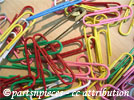 | Figure 1
Example 2
# First item ## First subitem (:table border=0 align=center margin-left:4em :) (:cellnr:) http://pmichaud.com/img/misc/pc.jpg"Paper clips" | '''Figure 1''' (:cell:) %width=50pct%http://pmichaud.com/img/misc/pc.jpg"Paper clips" | '''Figure 2''' (:tableend:) ## Second subitem (:table border=0 align=center padding-left:4em :) (:cellnr:) http://pmichaud.com/img/misc/pc.jpg"Paper clips" | '''Figure 1''' (:cell:) %width=50pct%http://pmichaud.com/img/misc/pc.jpg"Paper clips" | '''Figure 2''' (:tableend:) # Second item |
|
Not good enough
# First item ## First subitem || border=0 align=center || http://pmichaud.com/img/misc/pc.jpg"Paper clips"[[<<]]'''Figure 1''' || %width=50pct%http://pmichaud.com/img/misc/pc.jpg"Paper clips"[[<<]]'''Figure 2''' || ## Second subitem # Second item |
|
If I use border instead of text-decoration for defining my link styles in the CSS (e.g. let's say I want to use a dotted line or a different thickness to show the link), I find that my image links also get this decoration, even if I also define a corresponding "a img" style with that decoration disabled. What am I missing? I notice when I examine the resulting page that there is a gap between the image and the border, which does not seem to be part of the "a img" class but is only "a".
Make sure you add the "a img" style after the "a" definition.
Vertical Alignment (such as in tables, i.e. valign)
- Fill in details here...
Unable to upload images? If you get messages telling you that the upload was not able to complete for some reason, here's something to check. If your web host has your web site
with username
the system path (not http) to your website could be at
If you have your wiki installed at what you think is the system's root directory
your system's path to the wiki uploads directory might actually be
instead of the simpler
That's how I was able to get mine -> mailto:ispinn aatt gmail ddoott com working.
This is a talk page for improving PmWiki.Images.